
Running into the FATAL: Exceeded maximum connection limit (or FATAL: sorry, too many clients already) error in PostgreSQL can immediately bring application traffic to a standstill. This error occurs when the number of concurrent client sessions attempting to connect to your PostgreSQL database instance exceeds the defined threshold specified by the max_connections configuration setting.
Because PostgreSQL uses a process-per-connection architecture, every single connection consumes memory (work_mem, shared memory) and CPU scheduling time. When the limits are reached, the engine blocks any further incoming connections to prevent total system collapse.
In this guide, we will break down the exact causes of this database failure and walk through step-by-step solutions to resolve and prevent PostgreSQL connection limit issues once and for all.
Key Takeaways
- Root Cause: The
FATAL: Exceeded maximum connection limiterror triggers when active and idle application connections surpass themax_connectionssetting inpostgresql.conf. - Immediate Recovery: Terminate idle or lingering connections directly through
pg_stat_activityto free up slots without restarting the service. - Best Permanent Fix: Implement middleware connection pooling (like PgBouncer) or client-side application pooling rather than arbitrarily raising
max_connections. - Database Guardrails: Configure
idle_in_transaction_session_timeoutandstatement_timeoutto kill orphaned and abandoned sessions automatically. - Superuser Access: Always maintain reserved slots via
superuser_reserved_connectionsso administrators can log in during connection saturation incidents.
Understanding Why PostgreSQL Runs Out of Connections
By default, PostgreSQL sets max_connections = 100. While 100 connections sound sufficient for a growing application, modern microservices architectures, serverless functions (like AWS Lambda or Vercel), and auto-scaling backend deployments can rapidly exhaust these available slots.
Common triggers behind this bottleneck include:
- Connection Leaks: Application code opening new database connections without properly closing or returning them to the pool.
- Horizontal Auto-scaling: Multiplying application instances (pods/containers), where each instance initializes its own internal pool of connections, rapidly blowing past the database limit.
- Idle-in-Transaction Sessions: Client sessions starting a transaction (
BEGIN), performing an action, and stalling without executingCOMMITorROLLBACK. - Long-Running Queries: Unindexed, heavy analytical queries blocking standard backend processes from releasing client slots.
Step 1: Diagnose Active Connections in Real Time
When a connection exhaustion incident occurs, emergency access to your database is the first priority. If normal connections fail, attempt to log in as a superuser (e.g., postgres), which relies on reserved emergency slots.
Once connected, run the following SQL query to inspect current database activities:
SQL
SELECT pid, usename, client_addr, state, now() - state_change AS idle_duration, query
FROM pg_stat_activity
WHERE state IS NOT NULL
ORDER BY idle_duration DESC;
Analyzing Connection Counts by State
To see a summary of where all connection slots are being used, run:
SQL
SELECT state, count(*)
FROM pg_stat_activity
GROUP BY state;
If you notice dozens of connections in idle or idle in transaction states, your application is leaking connections or failing to manage session lifecycles correctly.
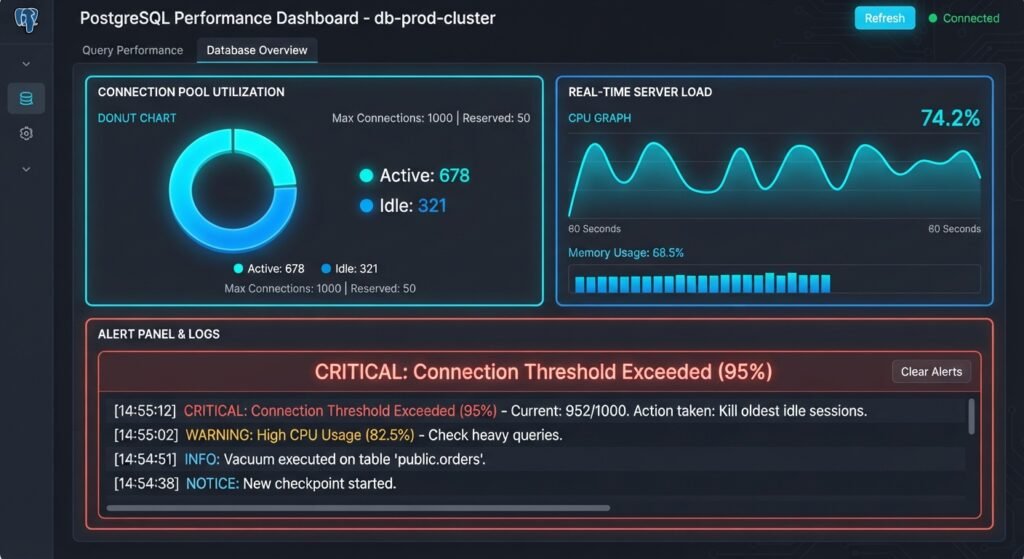
Step 2: Emergency Fix – Terminate Lingering Connections
If your database is completely saturated and you need to restore application uptime immediately, you can manually kill idle or hung sessions.
Terminate All Idle Connections
To terminate all sessions that have been in an idle state for more than 5 minutes:
SQL
SELECT pg_terminate_backend(pid)
FROM pg_stat_activity
WHERE state = 'idle'
  AND state_change < now() - INTERVAL '5 minutes'
  AND pid <> pg_backend_pid();
Terminate Stuck ‘Idle in Transaction’ Sessions
Connections stuck in idle in transaction are especially dangerous because they hold locks and prevent table maintenance:
SQL
SELECT pg_terminate_backend(pid)
FROM pg_stat_activity
WHERE state = 'idle in transaction'
  AND state_change < now() - INTERVAL '2 minutes'
  AND pid <> pg_backend_pid();
Step 3: Configure Automated Session Timeouts
Relying on manual intervention during production spikes is unsustainable. Configure PostgreSQL to clean up stale sessions automatically by setting connection timeouts in your postgresql.conf file or via SQL commands.
Execute the following commands to enforce automatic cleanup:
SQL
-- Automatically kill sessions lingering inside an open transaction for more than 2 minutes
ALTER SYSTEM SET idle_in_transaction_session_timeout = '120s';

-- Automatically close sessions that remain idle outside transactions for more than 10 minutes (PostgreSQL 14+)
ALTER SYSTEM SET idle_session_timeout = '600s';

-- Abort any statement that takes longer than 30 seconds to execute
ALTER SYSTEM SET statement_timeout = '30s';

-- Reload configuration without restarting PostgreSQL
SELECT pg_reload_conf();
Step 4: Implement Connection Pooling (The Ultimate Solution)
Increasing max_connections directly inside PostgreSQL should be your last resort. Because PostgreSQL spawns a full OS process per connection, setting max_connections = 1000 can consume several gigabytes of RAM just for connection overhead, leading to severe CPU context-switching and thrashing.
The industry standard fix for FATAL: Exceeded maximum connection limit is implementing Connection Pooling.
+-------------------+      +-------------------+      +---------------------+
|  App Instance 1   |      |  App Instance 2   |      |  Serverless Functions|
+---------+---------+      +---------+---------+      +----------+----------+
          |                          |                           |
          +------------------+       |       +-------------------+
                             |       |       |
                             v       v       v
                       +---------------------------+
                       |   PgBouncer (Pooler)      |
                       |  (Handles 1000s clients)   |
                       +-------------+-------------+
                                     | (e.g., 20-50 pooled connections)
                                     v
                       +---------------------------+
                       |    PostgreSQL Database    |
                       +---------------------------+
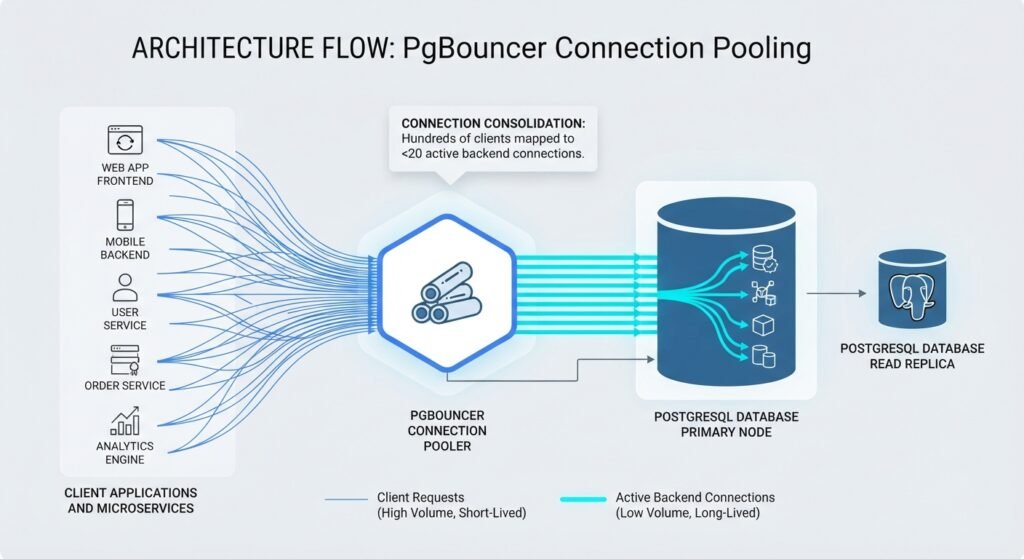
Setting Up PgBouncer
PgBouncer is a lightweight, open-source connection pooler that sits between your application backend and PostgreSQL. It holds thousands of client connections open at the proxy level while maintaining only a small set of persistent connections to the database engine.
Here is a simple pgbouncer.ini configuration setup:
Ini, TOML
[databases]
mydb = host=127.0.0.1 port=5432 dbname=mydb

[pgbouncer]
listen_addr = *
listen_port = 6432
auth_type = md5
auth_file = /etc/pgbouncer/userlist.txt
pool_mode = transaction
max_client_conn = 1000
default_pool_size = 20
pool_mode = transaction: The backend connection is assigned to the client only for the duration of a single transaction, maximizing pooling efficiency.max_client_conn = 1000: Allows up to 1,000 incoming app connections while passing onlydefault_pool_size(20 connections) to PostgreSQL.
Step 5: Adjusting max_connections Safely (If Necessary)
If you have scaled your underlying infrastructure hardware (adding RAM and vCPU cores) and legitimately require more direct backend connections, you can increase max_connections.
Step-by-Step Configuration Update
- Calculate Memory Overhead:Every connection requires memory. Ensure your system RAM can accommodate the change:$$\text{Total Memory} \approx \text{shared\_buffers} + (\text{max\_connections} \times \text{work\_mem})$$
- Edit
postgresql.conf:Locate your server configuration file and adjust the value:Ini, TOMLmax_connections = 300 shared_buffers = 2GB work_mem = 8MB - Restart PostgreSQL:Because
max_connectionsis a static parameter, a full service restart is required:Bashsudo systemctl restart postgresql - Verify New Settings:SQL
SHOW max_connections;

Conclusion
Resolving the FATAL: Exceeded maximum connection limit error in PostgreSQL requires a balance between immediate session management and sustainable database architecture. While killing idle processes provides instant relief during an outage, long-term database stability is built on automated idle timeouts, application pool optimization, and dedicated connection poolers like PgBouncer.
By structuring your connection pipeline properly, you eliminate connection starvation errors and ensure your PostgreSQL instance scales smoothly under heavy production loads.
Frequently Asked Questions (FAQs)
What is the default connection limit in PostgreSQL?
By default, PostgreSQL allows up to 100 simultaneous connections. However, three of these slots are typically reserved for superuser administration via superuser_reserved_connections = 3.
Is it safe to just increase max_connections in postgresql.conf?
No, simply raising max_connections to high numbers (e.g., 500+) without upgrading hardware can severely degrade database performance. Each connection consumes system resources, and having too many active backends causes high CPU context-switching overhead. Implementing connection pooling with tools like PgBouncer is always the safer and more scalable solution.
How do I prevent serverless applications from exceeding the PostgreSQL connection limit?
Serverless architectures (such as AWS Lambda, Vercel, or Netlify) spawn new function instances per request, which quickly leads to connection exhaustion. To solve this, route serverless connections through a managed database proxy or PgBouncer in transaction mode, or use serverless-ready HTTP database drivers (e.g., Neon serverless driver, Supabase Vector/PgBouncer endpoints).
What is the difference between idle and idle in transaction states in PostgreSQL?
An idle connection has executed a query and is simply waiting for the application to send a new request. An idle in transaction connection opened an explicit transaction (BEGIN) but has not yet called COMMIT or ROLLBACK. Idle in transaction sessions are critical bottlenecks because they hold database locks, prevent table vacuuming, and hold open connections indefinitely unless configured with timeouts.
1 thought on “How to Fix “FATAL: Exceeded maximum connection limit” in PostgreSQL”