
Relying exclusively on commercial cloud LLM APIs presents significant challenges for enterprise software teams:unpredictable token pricing, strict data privacy regulations (GDPR, HIPAA, SOC 2), latency overhead, and network reliance. As open-weight models (such as Llama 3, Mistral, and DeepSeek) approach or surpass proprietary models on specialized tasks, hosting open-weight models internally has become a primary infrastructure objective.
Learning how to deploy local LLMs on edge devices and private servers using Ollama & vLLM allows organizations to retain 100% data sovereignty, lower recurring token costs, and maintain ultra-low latency guarantees.However, raw model weights require significant compute and VRAM. Efficient local hosting relies on specialized runtime engines: Ollama for developer workstations and edge hardware, and vLLM for high-throughput multi-GPU production servers.
This comprehensive guide breaks down model quantization, VRAM budgeting, engine configuration, and step-by-step infrastructure setups to help you host local LLMs securely.
Key Takeaways
- Engine Specialization: Use Ollama for local developer workflows, edge devices, and single-user applications.Deploy vLLM for high-concurrency production workloads requiring dynamic request batching and high token throughput.
- Quantization Optimization: Quantizing weights to 4-bit or 8-bit formats (such as GGUF or AWQ) reduces model memory footprints by 50–75% with minimal degradation in model accuracy.
- PagedAttention Efficiency: vLLM’s PagedAttention algorithm manages Key-Value (KV) cache memory like virtual OS memory, eliminating VRAM fragmentation and enabling up to 24x higher throughput than standard PyTorch setups.
- Zero Data Leakage: Local deployment keeps proprietary prompts, source code, and customer data isolated inside private network perimeters, eliminating third-party data retention risks.
The Infrastructure Choice: Ollama vs. vLLM
Before deploying models, engineering teams must align their target environment with the appropriate inference engine.
┌────────────────────────────────────────────────────────────────────────┐
│                   OLLAMA vs. vLLM INFERENCE MATRIX                     │
├───────────────────────────────┬────────────────────────────────────────┤
│ ARCHITECTURAL FEATURE         │ OLLAMA                                 │ vLLM                                  │
├───────────────────────────────┼────────────────────────────────────────┼───────────────────────────────────────┤
│ Target Environment            │ Edge devices, Mac Workstations,        │ Private enterprise GPU servers,       │
│                               │ single local Linux/Windows nodes       │ Kubernetes clusters, cloud instances  │
├───────────────────────────────┼────────────────────────────────────────┼───────────────────────────────────────┤
│ Primary Focus                 │ Developer UX, low overhead,            │ Extreme token throughput, concurrent  │
│                               │ effortless model swapping              │ multi-user handling, continuous batching│
├───────────────────────────────┼────────────────────────────────────────┼───────────────────────────────────────┤
│ Model Format                  │ GGUF (CPU/GPU hybrid offloading)       │ AWQ, GPTQ, FP16, BF16, Unsloth         │
├───────────────────────────────┼────────────────────────────────────────┼───────────────────────────────────────┤
│ Memory Management             │ GGML runtime memory allocation         │ PagedAttention (Virtual KV Cache)     │
├───────────────────────────────┼────────────────────────────────────────┼───────────────────────────────────────┤
│ API Support                   │ OpenAI-compatible REST + Native CLI    │ OpenAI-compatible v1 Server Endpoint  │
└───────────────────────────────┴────────────────────────────────────────┴───────────────────────────────────────┘
Phase 1: Deploying LLMs on Edge Devices with Ollama
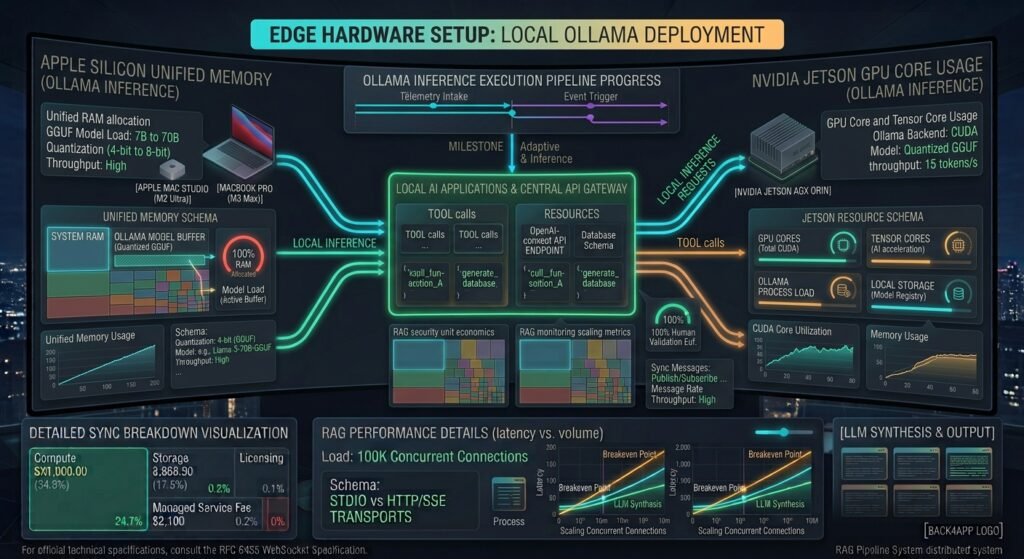
Ollama wraps the C/C++ llama.cpp library into a user-friendly daemon, making it the premier choice for edge deployments, Apple Silicon hardware, and local developer workstations.
Understanding GGUF and Model Quantization
Edge deployment relies on GGUF (GPT-Generated Unified Format), a binary format that packs model weights and metadata into a single file. Quantization reduces the precision of model weights from 16-bit floating points (FP16) to lower bit representations (Q4_K_M or Q8_0):
VRAM Required (GB)≈(8Parameter Count in Billions×Bits per Weight)×1.2
For example, a 7-billion parameter model running at Q4 precision requires approximately 4.2 GB of VRAM (plus 1–2 GB overhead for the KV cache), making it playable on budget consumer GPUs or Apple Silicon M-series chips with unified memory.
┌─────────────────────────────────────────────────────────────────────────┐
│                      OLLAMA EDGE ARCHITECTURE                           │
├───────────────────┬─────────────────────────────────────────────────────┤
│ User Request      │ Local REST API (`http://localhost:11434`)           │
├───────────────────┼─────────────────────────────────────────────────────┤
│ Ollama Daemon     │ Handles request queue, prompt formatting, and GGUF │
│                   │ weight offloading to unified CPU/GPU memory.        │
├───────────────────┼─────────────────────────────────────────────────────┤
│ Local Application │ Connects directly to local models inside IDEs,      │
│                   │ terminal CLI tools, or background agents.           │
└───────────────────┴─────────────────────────────────────────────────────┘
Step-by-Step Edge Setup
- Install Ollama on Edge Hardware:Bash
# On Linux / Edge Server curl -fsSL https://ollama.com/install.sh | sh - Create a Custom Modelfile: To set system instructions and context windows, create a
Modelfile:DockerfileFROM llama3:8b-instruct-q4_K_M PARAMETER temperature 0.2 PARAMETER num_ctx 8192 SYSTEM """ You are an isolated, high-precision technical assistant operating on a private network edge. """ - Build and Serve the Model:Bash
ollama create custom-edge-llama -f ./Modelfile ollama run custom-edge-llama "Explain the Model Context Protocol."
Phase 2: Deploying Production LLMs on Private Servers with vLLM
When building multi-tenant internal APIs, enterprise platforms require high throughput and concurrent request handling. vLLM is an open-source LLM serving engine built for high concurrency.
How PagedAttention Eliminates VRAM Waste
Traditional LLM serving engines allocate contiguous blocks of GPU memory for the Key-Value (KV) cache based on maximum sequence lengths (e.g., 4096 tokens). This leads to severe memory fragmentation, leaving up to 60–80% of VRAM unused.
vLLM resolves this using PagedAttention:
- Breaks the KV cache into fixed-size physical memory blocks.
- Maps non-contiguous GPU memory pages dynamically, similar to virtual memory management in operating systems.
- Enables dynamic continuous batching, allowing incoming user requests to join running inference batches instantly without waiting for prior sequences to finish.
┌────────────────────────────────────────────────────────────────────────┐
│                   TRADITIONAL vs. PAGEDATTENTION MEMORY                │
├───────────────────────────────┬────────────────────────────────────────┤
│ TRADITIONAL ALLOCATION        │ vLLM PAGEDATTENTION                    │
├───────────────────────────────┼────────────────────────────────────────┤
│ Pre-allocates fixed max-length│ Allocates dynamic physical pages       │
│ memory blocks per request     │ on-demand                              │
│ High internal fragmentation   │ Near-zero memory fragmentation (<1%)   │
│ Low concurrent user density   │ Extremely high batching and throughput │
└───────────────────────────────┴────────────────────────────────────────┘

Deploying vLLM via Docker on Private GPU Nodes
To run a multi-GPU private server with AWQ quantization:
- Launch vLLM Container with Docker:Bash
docker run --gpus all \ -v ~/.cache/huggingface:/root/.cache/huggingface \ -p 8000:8000 \ --ipc=host \ vllm/vllm-openai:latest \ --model casperhansen/llama-3-70b-instruct-awq \ --quantization awq \ --tensor-parallel-size 2 \ --max-model-len 8192 \ --gpu-memory-utilization 0.95 - Query the OpenAI-Compatible Endpoint: vLLM exposes a native OpenAI-compatible REST server:Bash
curl http://localhost:8000/v1/chat/completions \ -H "Content-Type: application/json" \ -d '{ "model": "casperhansen/llama-3-70b-instruct-awq", "messages": [{"role": "user", "content": "Draft a zero-downtime migration plan."}], "temperature": 0.1 }'
For detailed technical references on configuring multi-GPU distributed tensor parallelism, consult the official vLLM Documentation.
Benchmarking Performance: Ollama vs. vLLM
┌─────────────────────────────────────────────────────────────────────────────────┐
│                    PERFORMANCE BENCHMARK SUMMARY                                │
├──────────────┬──────────────────┬──────────────────┬────────────────────────────┤
│ METRIC       │ OLLAMA           │ vLLM             │ PRODUCTION WINNER          │
├──────────────┼──────────────────┼──────────────────┼────────────────────────────┤
│ Single-User  │ Fast (<30ms)     │ Fast (<40ms)     │ Tie (Ollama is easier to   │
│ Time-to-First│                  │                  │ configure locally)         │
│ Token (TTFT) │                  │                  │                            │
├──────────────┼──────────────────┼──────────────────┼────────────────────────────┤
│ High Concurrent│ Moderate         │ Exceptional      │ **vLLM** (Scales smoothly  │
│ Throughput   │ (Queue bottleneck│ (Continuous      │ under load)                │
│              │ under heavy load)│ batching)        │                            │
├──────────────┼──────────────────┼──────────────────┼────────────────────────────┤
│ VRAM Efficiency│ Standard GGML    │ PagedAttention   │ **vLLM** (Eliminates       │
│              │ allocation       │ block management │ memory waste)              │
└──────────────┴──────────────────┴──────────────────┴────────────────────────────┘

Conclusion
Mastering how to deploy local LLMs on edge devices and private servers using Ollama & vLLM gives engineering teams complete control over their AI infrastructure. Ollama simplifies local developer setups, desktop environments, and edge deployments through lightweight GGUF quantization. Meanwhile, vLLM delivers the enterprise-grade throughput, PagedAttention memory efficiency, and multi-GPU tensor parallelism required to serve high-concurrency production workloads.
By bringing open-weight models inside your private network boundaries, you protect sensitive enterprise data,eliminate recurring third-party API costs, and build a resilient foundation for custom AI applications.
Frequently Asked Questions (FAQs)
What hardware is required to deploy a local LLM?
For edge devices using Ollama, an Apple Silicon Mac (M1/M2/M3/M4 with 16GB+ unified memory) or a consumer GPU (NVIDIA RTX 3090/4090 with 24GB VRAM) can run 7B to 13B parameter models comfortably at 4-bit quantization. For enterprise workloads running 70B parameter models on vLLM, private servers with dual NVIDIA A100/H100 GPUs or multiple RTX 6000 Ada workstations are recommended.
Is Ollama suitable for high-concurrency production environments?
No. Ollama is designed primarily for single-user developer workflows, edge devices, and local testing. For high-concurrency production environments serving dozens or hundreds of simultaneous requests, vLLM is preferred due to its dynamic continuous batching and PagedAttention algorithms.
How much accuracy is lost when using 4-bit model quantization?
Modern quantization methods (such as GGUF Q4_K_M or AWQ) result in negligible quality loss for most natural language and coding tasks, while reducing VRAM usage and memory bandwidth requirements by roughly 70% compared to 16-bit unquantized models.
1 thought on “How to Deploy Local LLMs on Edge Devices and Private Servers Using Ollama & vLLM”