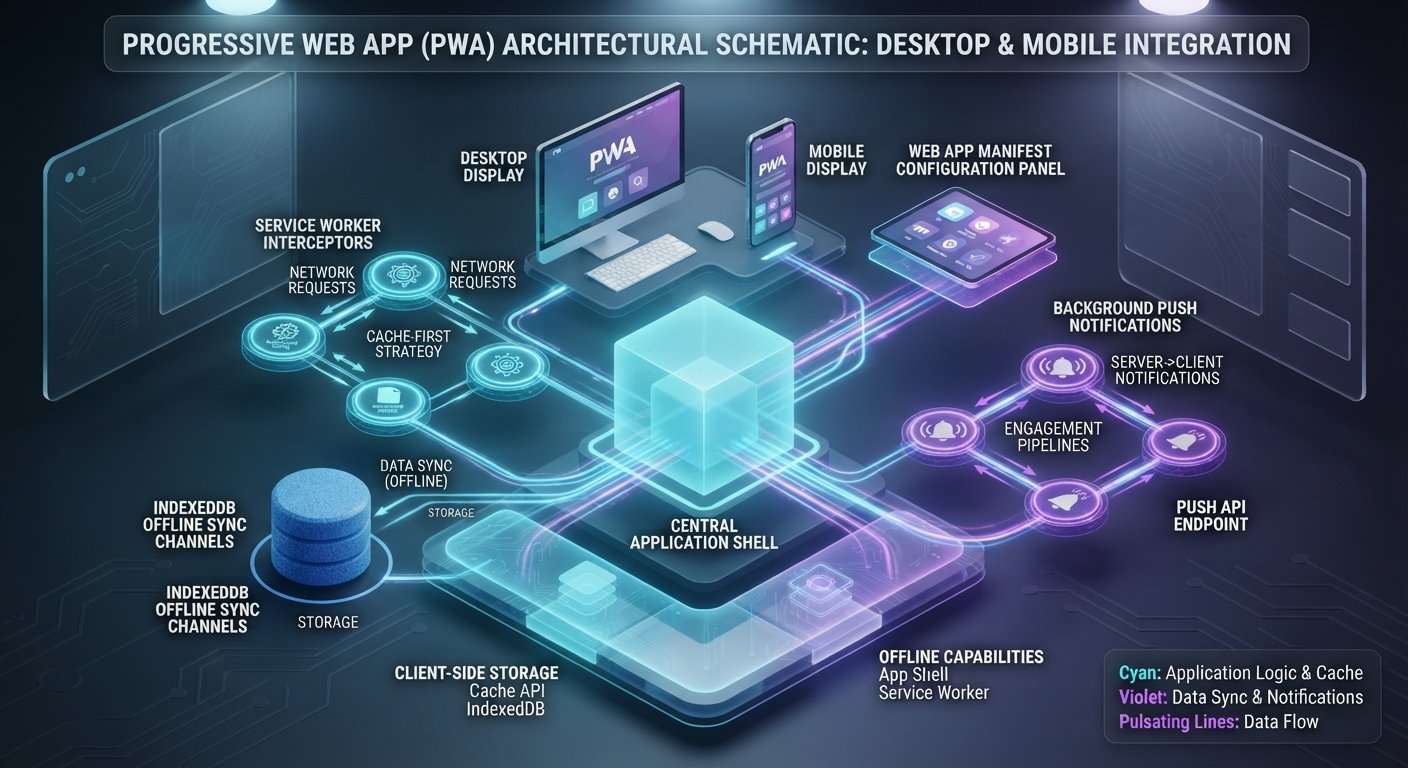
Progressive Web Apps (PWAs) have transformed cross-platform software delivery by combining the global discoverability of web applications with the native user experience of mobile and desktop software. Rather than maintaining separate codebases for iOS, Android, and web, developers can deliver high-performance, offline-ready applications through a single modern web codebase.
A comprehensive breakdown of building progressive web apps (PWAs) best practices and architecture overview reveals how underlying technologies—such as Service Workers, Web App Manifests, and IndexedDB—work together to deliver fast loading times, reliable offline functionality, and platform-level integration. This guide provides software architects and frontend engineers with actionable design patterns, caching strategies, and performance frameworks necessary to build enterprise-grade PWAs.
Key Takeaways
- Core Architectural Components: Essential elements of building progressive web apps (PWAs) best practices and architecture overview rely on three foundations: HTTPS security, a Web App Manifest JSON file, and background Service Worker threads.
- App Shell Architecture: Separating static UI frames (the App Shell) from dynamic runtime content allows immediate rendering on initial page load, optimizing Core Web Vitals such as First Contentful Paint (FCP).
- Intelligent Service Worker Caching: Choosing the right caching strategy (e.g., Cache First, Network First, or Stale-While-Revalidate) depending on asset types ensures offline reliability without serving stale data.
- Native Platform Integration: Leveraging modern web APIs (Web App Manifest shortcuts, Background Sync, and Web Push Notifications) creates native app-like desktop and mobile experiences.
Core Pillars of PWA Architecture
To build a installable, secure, and resilient web application, engineers must structure software around three mandatory technical components.
┌────────────────────────────────────────────────────────────────────────┐
│                   PROGRESSIVE WEB APP ARCHITECTURE                     │
├───────────────────────────────┬────────────────────────────────────────┤
│ SERVICE WORKER THREAD         │ WEB APP MANIFEST                       │
├───────────────────────────────┼────────────────────────────────────────┤
│ - Background Request Proxy    │ - Manifest JSON Configuration          │
│ - Offline Resource Caching    │ - Home Screen & App Icons              │
│ - Background Data Sync        │ - Display Modes & Theme Colors         │
│ - Push Notification Handling  │ - Start URL & Scope Routing            │
├───────────────────────────────┴────────────────────────────────────────┤
│ SECURE HTTPS ORIGIN                                                    │
│ - TLS Encryption for Data Integrity & Service Worker Registration     │
└────────────────────────────────────────────────────────────────────────┘
1. HTTPS Security Requirement
Browsers require secure origins (HTTPS) to register Service Workers. Because Service Workers act as client-side network proxies capable of intercepting and modifying HTTP requests, TLS encryption is necessary to prevent man-in-the-middle attacks.
2. The Web App Manifest
The Web App Manifest (manifest.json) is a JSON metadata file that informs the operating system and browser how to present the app when installed on desktop or mobile devices. Key attributes include:
name/short_name: Display titles on the device home screen, launch prompts, and app launchers.start_url: The entry URL loaded when launching the installed PWA.display: Controls browser chrome presentation (standalone,minimal-ui, orfullscreen).icons: Scalable PNG or WebP icon arrays used for device home screens, taskbars, and splash screens.
3. Service Workers and Background Processing
A Service Worker is an event-driven JavaScript web worker running on a background thread separate from the main DOM thread. It intercepts network requests, manages client-side offline storage, and executes background synchronization tasks without blocking user UI interactions.
To see how backend application latency directly influences frontend user performance, read our guide on [How to Optimize Web Application Performance and Reduce Server Latency]([Internal Link: Insert relevant internal URL here with anchor text]).
The App Shell Architecture Model
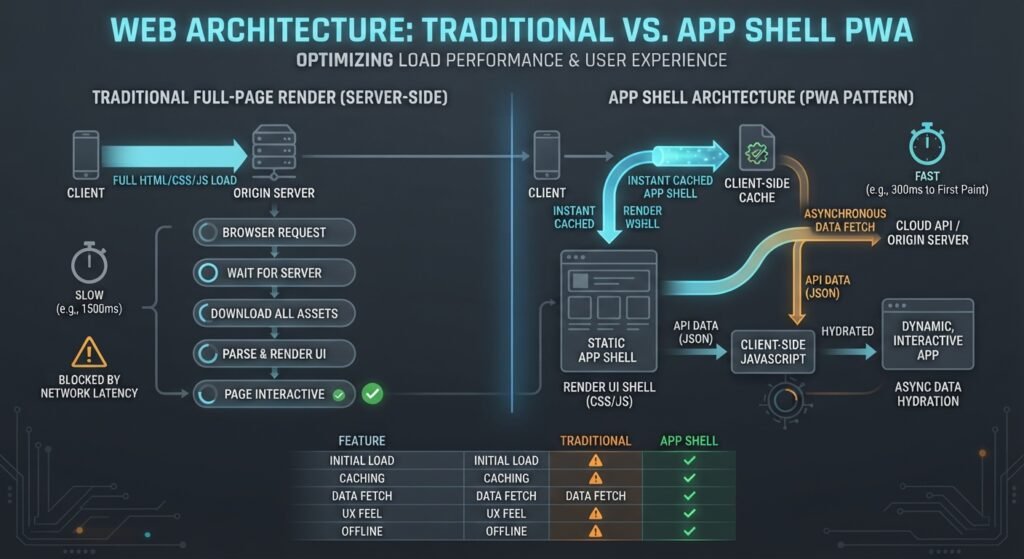
The App Shell design pattern isolates the minimal HTML, CSS, and client-side JavaScript required to render the application’s core structural layout (headers, navigation drawers, layout containers) from dynamic payload data.
┌─────────────────────────────────────────────────────────────────────────────────┐
│                          APP SHELL ARCHITECTURE MODEL                           │
├───────────────────────────────────────┬─────────────────────────────────────────┤
│ APP SHELL (STATIC / CACHED)           │ DYNAMIC CONTENT (FETCHED VIA API)       │
├───────────────────────────────────────┼─────────────────────────────────────────┤
│ - Static HTML Shell Frame             │ - Dynamic JSON API Data                 │
│ - Global CSS Stylesheets              │ - User Profile Feeds                    │
│ - Core Client-Side JS Bundles         │ - Real-Time Dashboard Metrics           │
│ - App Logos & SVG Icons               │ - Media Files & User Uploads            │
└───────────────────────────────────────┴─────────────────────────────────────────┘
By pre-caching the App Shell using a Service Worker on initial installation, the application renders instantly on subsequent launches—even when offline or operating under poor network conditions. Once loaded, the shell asynchronously fetches dynamic business data via REST or GraphQL APIs to populate the interface.
Service Worker Caching Strategies
Designing an efficient PWA requires matching appropriate caching strategies to specific resource types. Mixing static assets and real-time APIs under a single caching model can result in stale UI states or unnecessary network latency.
┌─────────────────────────────────────────────────────────────────────────────────┐
│                   SERVICE WORKER CACHING STRATEGY DECISION MATRIX               │
├────────────────────────┬──────────────────────────┬─────────────────────────────┤
│ STRATEGY PATTERN       │ EXECUTION FLOW           │ RECOMMENDED USE CASES       │
├────────────────────────┼──────────────────────────┼─────────────────────────────┤
│ Cache First            │ Check Cache ──► Network │ Static JS/CSS, Images, Fonts│
│ Network First          │ Check Network ──► Cache │ User Feeds, Live Stock Data │
│ Stale-While-Revalidate │ Serve Cache ──► BG Sync  │ User Profiles, Static Content│
│ Network Only           │ Bypass Cache ──► Direct  │ Authentication, Payments    │
└────────────────────────┴──────────────────────────┴─────────────────────────────┘
1. Cache First (Falling Back to Network)
Requests bypass the network and serve directly from the Cache Storage API if found. If missed, the Service Worker fetches the file from the origin server and updates the cache. Ideal for static versioned assets (JavaScript bundles, CSS stylesheets, web fonts, brand logos).
2. Network First (Falling Back to Cache)
The Service Worker attempts to retrieve fresh content over the network. If the device is offline or the network times out, it falls back to the most recently cached version. Essential for dynamic data feeds and user-generated content where fresh information is preferred.
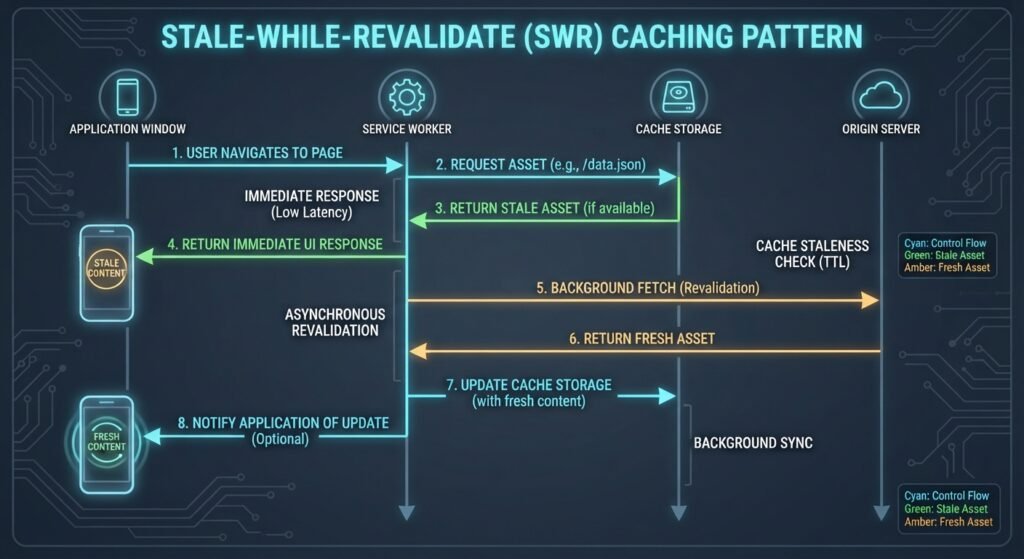
3. Stale-While-Revalidate
Serves cached content immediately to optimize speed, while simultaneously launching a background network request to update the cache for subsequent visits. Recommended for non-critical dynamic content such as user profile icons or social feeds.
Best Practices for PWAs in Production
Adhering to modern frontend standards ensures your PWA operates reliably across varied browser environments and screen sizes.
┌─────────────────────────────────────────────────────────────────────────────────┐
│                      PWA PRODUCTION BEST PRACTICES CHECKLIST                    │
├──────────────┬──────────────────┬──────────────────┬────────────────────────────┤
│ PRACTICE 1   │ PRACTICE 2       │ PRACTICE 3       │ PRACTICE 4                 │
│ Implement    │ Utilize IndexedDB│ Graceful Offline │ Progressive Enhancement &  │
│ Responsive   │ for Offline Data │ Fallback UX      │ Feature Detection          │
│ Layouts      │ Persistence      │ Messaging        │ Strategies                 │
└──────────────┴──────────────────┴──────────────────┴────────────────────────────┘
- Leverage IndexedDB for Offline Data Persistence: Store dynamic JSON payloads, draft form inputs, and transactional data client-side using IndexedDB. Unlike
localStorage, IndexedDB provides asynchronous, non-blocking storage capable of handling large datasets. - Design Contextual Offline UI Fallbacks: Avoid showing browser “offline connection error” pages. Provide informative offline status indicators, cached historical content, and clear messaging to help users complete offline actions.
- Apply Progressive Enhancement: Use feature detection (
if ('serviceWorker' in navigator)) to ensure core functionality remains usable on legacy browsers. Advanced features, such as background sync and push notifications, should enhance the experience when supported without breaking basic usability. - Optimize Installation Experience: Earn installation requests by prompting users after they have meaningfully engaged with your application, rather than triggering aggressive install banners on initial page load.
For web compatibility standards and PWA installation guidelines, consult the official MDN Progressive Web Apps Documentation.
Technical Feature Matrix: Web vs Native vs PWA
| Feature Capabilities | Traditional Web App | Native Mobile App | Progressive Web App |
|---|---|---|---|
| Cross-Platform Compatibility | High (Browser Dependent) | Low (Separate Codebases) | Very High (Single Codebase) |
| Offline Usability | None / Limited | Native Storage | High (Service Workers + IndexedDB) |
| Installation Friction | None (URL Access) | High (App Store Downloads) | Low (Instant Browser Install) |
| Update Cycle | Instant Server Deploy | App Store Approval Delay | Instant Server Deploy |
| Hardware / OS Integration | Limited APIs | Full Hardware Access | Growing Capabilities (Web APIs) |
Conclusion
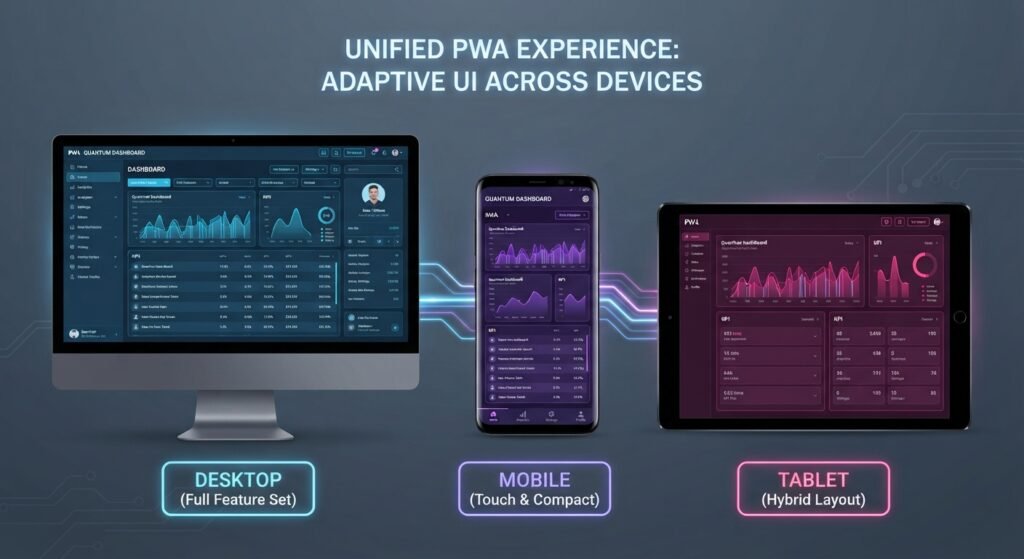
Understanding building progressive web apps (PWAs) best practices and architecture overview equips software teams to deliver fast, resilient, and accessible web experiences. By combining a secure HTTPS origin with an App Shell model, tailored Service Worker caching strategies, and robust offline data handling, PWAs bridge the gap between traditional websites and native applications. Incorporating these practices helps ensure web applications remain performant, discoverable, and engage users across any device or network condition.
Frequently Asked Questions (FAQs)
Why is HTTPS mandatory when building progressive web apps (PWAs)?
HTTPS is required because Service Workers run background scripts capable of intercepting, modifying, and caching network requests. Operating over an encrypted TLS connection prevents malicious actors on public networks from performing man-in-the-middle attacks or injecting unauthorized scripts.
What is the difference between Cache Storage and IndexedDB in PWA architecture?
Cache Storage is designed to store HTTP network responses (HTML, CSS, JS, and image files) directly key-indexed by URL requests. IndexedDB is a client-side NoSQL transactional database used for storing structured data, such as JSON documents, user preferences, and offline form submissions.
How do Service Workers handle application updates when new code is deployed?
When a Service Worker JavaScript file is modified on the server, the browser detects the byte-difference and installs the new worker in the background. It enters a “waiting” state until all open tabs using the older Service Worker instance are closed, preventing data corruption across active sessions.
1 thought on “Building Progressive Web Apps (PWAs): Best Practices and Architecture Overview”