
Full-stack development demands relentless context switching. In a single engineering sprint, developers juggle frontend state management, backend REST APIs, database schema migrations, CI/CD pipelines, and cloud deployment configurations. Managing these distinct operational layers traditionally meant searching through documentation, manually tracking breaking changes across dependencies, and writing repetitive boilerplate.
Modern development tools have evolved beyond basic single-line code autocompletion. The top AI-assisted Integrated Development Environments (IDEs) for full-stack developers leverage deep semantic codebase indexing, agentic execution loops, and multi-file reasoning capabilities. These platforms act as real-time pair programmers—refactoring cross-stack architectures, writing unit tests, and diagnosing build errors directly inside your workspace.
Whether you are shipping full-stack SaaS applications using Next.js and PostgreSQL or scaling polyglot microservices, choosing the right AI-assisted IDE is vital for maximizing engineering speed and maintaining clean code standards.
Key Takeaways
- Native AI Editors vs. Extensions: AI-native IDEs like Cursor and Windsurf index entire repositories using vector embeddings, outperforming traditional plugin-based extensions on complex multi-file tasks.
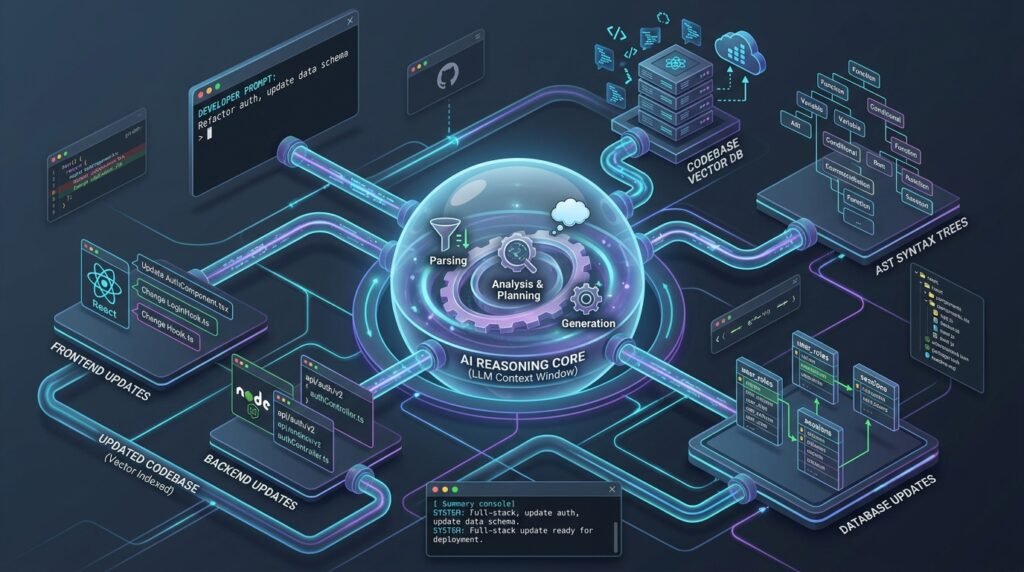
- Full-Stack Context Awareness: Leading AI editors analyze frontend components, backend endpoints, and database schemas concurrently, preventing breaking contract changes across application layers.
- Agentic Terminal Control: Next-generation coding assistants can execute shell commands, run test runners, interpret build failures, and automatically iterate on solutions within secure sandboxes.
- Security & Privacy Safeguards: Enterprise development requires platforms with Zero Data Retention (ZDR), SOC 2 Type II compliance, and local model execution options to protect proprietary codebases.
What Makes an AI IDE Essential for Full-Stack Engineering?
Building across the full stack means a change in one file frequently triggers a chain reaction across others. Adding a database column requires modifying your backend ORM schemas, updating API serialization routes, adjusting client-side data fetching hooks, and updating UI types.
┌────────────────────────────────────────────────────────────────────────┐
│                   FULL-STACK AI-ASSISTED IDE MATRIX                    │
├───────────────────────────────┬────────────────────────────────────────┤
│ CAPABILITY                    │ TECHNICAL BENEFIT                      │
├───────────────────────────────┼────────────────────────────────────────┤
│ Deep Codebase Indexing        │ Generates vector embeddings of all     │
│                               │ files to track cross-layer logic.      │
├───────────────────────────────┼────────────────────────────────────────┤
│ Multi-File Refactoring        │ Edits frontend, backend, and schema    │
│                               │ files simultaneously in one session.   │
├───────────────────────────────┼────────────────────────────────────────┤
│ Agentic Execution Loops       │ Runs terminal commands, interprets     │
│                               │ errors, and auto-corrects code.        │
├───────────────────────────────┼────────────────────────────────────────┤
│ Context Protocol Integration  │ Connects directly to external API      │
│ (e.g., MCP)                   │ docs, SQL databases, and issue trackers│
└───────────────────────────────┴────────────────────────────────────────┘
A generic AI autocomplete tool lacks the context needed to manage these multi-layer dependencies. Dedicated AI IDEs analyze your entire project structure, preserving architectural consistency across every layer of your stack.
The Best AI-Assisted IDEs for Full-Stack Developers
Here is a detailed breakdown of the leading AI-assisted IDEs driving modern software engineering teams.
1. Cursor: The Gold Standard for Multi-File Refactoring
Cursor has emerged as a premier AI-native editor. Built as a custom fork of Visual Studio Code, Cursor maintains full compatibility with standard VS Code extensions and keybindings while re-architecting the editing interface around deep AI integration.
┌─────────────────────────────────────────────────────────────────────────┐
│                    CURSOR AI ENGINE ARCHITECTURE                        │
├───────────────────┬─────────────────────────────────────────────────────┤
│ Composer Mode     │ Handles complex multi-file edits across backend,    │
│                   │ frontend, and database schema layers.               │
├───────────────────┼─────────────────────────────────────────────────────┤
│ Tab Autocomplete  │ Predicts next-line edits and cursor placement       │
│                   │ based on local AST and recent change history.       │
├───────────────────┼─────────────────────────────────────────────────────┤
│ Semantic Indexing │ Builds local vector embeddings of your repository   │
│                   │ for precise context retrieval on large codebases.   │
└───────────────────┴─────────────────────────────────────────────────────┘
- Composer Mode: Allows developers to prompt multi-file architectural builds. Prompting “Add a Stripe webhook endpoint, update the user subscription database schema, and reflect the status on the settings page” prompts Cursor to create or modify all necessary files simultaneously.
- Model Context Protocol (MCP) Support: Connects Cursor directly to external tools, local database instances, and live documentation servers.
- Granular Controls: Gives engineers full model selection control (e.g., switching between Claude, GPT, or custom models depending on task complexity).
Best For: Full-stack developers working on large existing repositories who need precise, multi-file edits and agentic workflow options.

2. Windsurf: Flow-State Agentic Automation
Developed under Codeium (and integrated into Cognition’s ecosystem), Windsurf is an AI-first editor designed around “Cascade”—an agentic framework built to minimize context-switching.
- Cascade Flows: Windsurf tracks developer actions continuously, inferring intent and proactively suggesting next steps across files without requiring explicit manual prompting.
- High-Autonomy Agent Execution: Windsurf’s agent mode can inspect workspace files, run terminal commands, inspect build errors, and iterate until a task passes validation.
- Deep Codebase Awareness: Maintains a real-time graph of your full-stack application, ensuring API type changes on the server side instantly inform client-side code suggestions.
Best For: Engineers who prefer a streamlined, agentic experience that automates repetitive boilerplate and multi-step plumbing tasks.
3. JetBrains IDEs + JetBrains AI Assistant: Native AST Intelligence
For developers who rely on language-specific environments such as WebStorm, PyCharm, IntelliJ IDEA, or GoLand, JetBrains offers native AI capabilities built into its core IDE platform.
- AST-Driven Precision: Unlike basic text-matching tools, JetBrains AI leverages the platform’s native Abstract Syntax Tree (AST) parsing. This delivers accurate refactoring and code generation in strongly-typed backend languages (Java, Kotlin, C#, Go) and modern JavaScript/TypeScript frameworks.
- DataGrip Integration: Connects AI suggestions directly to native database management tools, aiding in complex SQL query optimization, schema migration checks, and indexing analysis.
Best For: Polyglot software engineers and enterprise backend developers managing microservices inside established JetBrains workflows.
To see how specialized database tools improve query performance and schema management alongside your IDE, read our evaluation of the [Top Database Management & GUI Clients for Postgres and MySQL]([Internal Link: Insert relevant internal URL here with anchor text]).
4. VS Code + GitHub Copilot: The Modular Workhorse
Visual Studio Code combined with GitHub Copilot remains one of the most widely adopted setups in the industry. Operating as an extension rather than a complete editor fork, Copilot provides a flexible, modular AI layer inside your existing development environment.
- Ecosystem Integration: Fits into GitHub workflows, including GitHub Actions CI/CD pipelines, issue tracking, and automated pull request reviews.
- Copilot Edits & Workspace: Multi-file editing sessions and inline terminal chat assist with debugging build failures directly within VS Code.
- Model Choice Flexibility: Supports routing queries across top-tier foundation models, giving developers control over reasoning vs. speed trade-offs.
Best For: Developers who want to preserve their existing extension ecosystem while adding reliable inline completions and chat assistance.
For official details on configuring GitHub Copilot enterprise settings and workspace context, consult the GitHub Copilot Documentation.
Head-to-Head Comparison: Top AI-Assisted IDEs
┌─────────────────────────────────────────────────────────────────────────────────┐
│                      TOP AI IDE COMPARISON SUMMARY                              │
├──────────────┬──────────────────┬──────────────────┬────────────────────────────┤
│ PLATFORM     │ EDITING MODEL    │ STRENGTHS        │ BEST USE CASE              │
├──────────────┼──────────────────┼──────────────────┼────────────────────────────┤
│ Cursor       │ VS Code Fork     │ Composer mode,   │ Multi-file refactoring     │
│              │ (Native AI)      │ deep control     │ on large codebases         │
├──────────────┼──────────────────┼──────────────────┼────────────────────────────┤
│ Windsurf     │ VS Code Fork     │ Cascade flow,    │ High-autonomy agent        │
│              │ (Native AI)      │ low friction     │ feature generation         │
├──────────────┼──────────────────┼──────────────────┼────────────────────────────┤
│ JetBrains AI │ Native IDE Suite │ AST parsing,     │ Polyglot microservices,    │
│              │ Integration      │ DataGrip tools   │ enterprise backends        │
├──────────────┼──────────────────┼──────────────────┼────────────────────────────┤
│ VS Code +    │ Modular Extension│ Broad ecosystem, │ Developer-controlled       │
│ Copilot      │ Ecosystem        │ GitHub workflow  │ modular setup              │
└──────────────┴──────────────────┴──────────────────┴────────────────────────────┘
Best Practices for Optimizing Your AI IDE Workflow
Deploying top AI-assisted Integrated Development Environments (IDEs) for full-stack developers yields the best results when paired with strong project configuration:
- Maintain Explicit Project Rules: Create project-level configuration files (such as
.cursorrulesor workspace rule markdowns). Define your coding standards, framework conventions (e.g., “Use Next.js App Router, Tailwind CSS, and Drizzle ORM”), and error-handling patterns to guide the AI. - Exclude Non-Essential Directories: Exclude large build output folders (
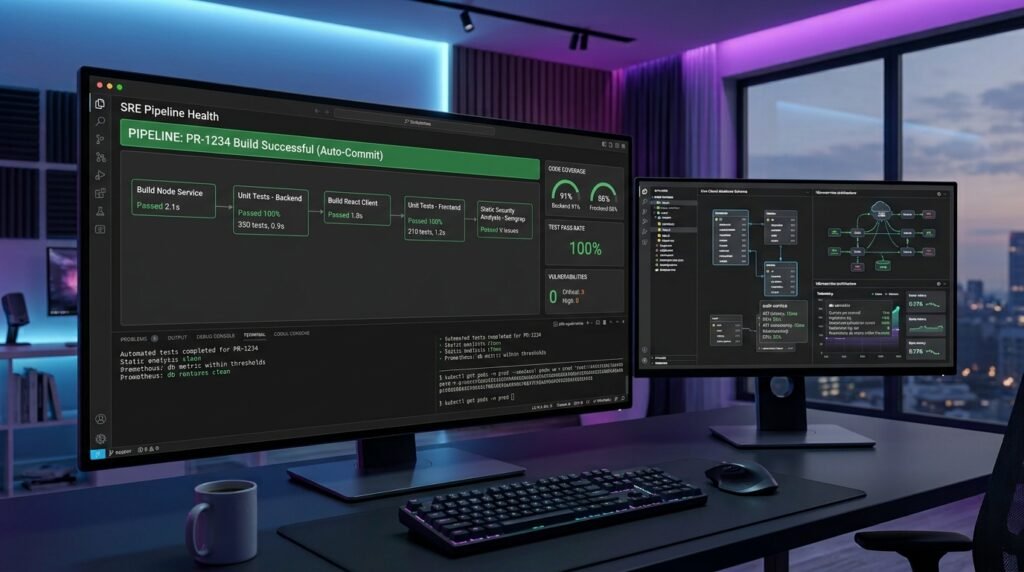
node_modules,.next,dist, build logs) from codebase indexing to ensure fast, relevant context retrieval. - Verify AI Code via Automated Tests: Always run unit, integration, and type-checking suites before committing AI-generated code. Never treat AI outputs as verified production code without test coverage.
Conclusion
Choosing from the top AI-assisted Integrated Development Environments (IDEs) for full-stack developers comes down to your architectural requirements, existing editor habits, and preferred level of AI autonomy. Standalone platforms like Cursor and Windsurf lead the market in multi-file refactoring and hands-off agent execution. At the same time, traditional setups like JetBrains AI and VS Code + GitHub Copilot offer exceptional stability, deep language AST parsing, and broad extension ecosystems.
By integrating project-specific rule files, leveraging semantic codebase indexing, and backing up generated code with automated test pipelines, full-stack developers can significantly boost coding velocity without sacrificing software quality.
Frequently Asked Questions (FAQs)
What is the best AI-assisted IDE for full-stack developers overall?
Cursor and Windsurf are widely considered top choices for modern web and full-stack development due to their native multi-file editing capabilities, agentic terminals, and deep codebase indexing. For enterprise polyglot backends, JetBrains IDEs with JetBrains AI offer superior language-specific structural analysis.
How do AI-assisted IDEs handle multi-file changes across frontend and backend code?
Modern AI-native IDEs build vector embeddings of your entire repository. When you prompt a change, the AI queries this index to understand how backend API changes impact client-side data fetching hooks and TypeScript interfaces, allowing it to propose edits across multiple files in a single session.
Are AI-assisted IDEs safe to use on proprietary enterprise codebases?
Yes, provided you choose enterprise plans that offer Zero Data Retention (ZDR) and SOC 2 Type II compliance. These tiers guarantee that your proprietary source code is never cached, logged, or used to train public foundation models.
1 thought on “Top AI-Assisted Integrated Development Environments for Full-Stack Developers”