
Relying on public cloud LLM APIs poses major risks for enterprise software teams, including escalating per-token operating costs, unpredictable latency spikes, and severe compliance hazards regarding proprietary data privacy. When sensitive intellectual property, medical records, or corporate data are sent across external networks, compliance frameworks like HIPAA, GDPR, and SOC2 can easily be compromised.
Deploying local LLMs on edge devices and private servers using Ollama & vLLM gives organizations absolute sovereignty over their artificial intelligence stack. By hosting open-weight models (such as Llama 3, Qwen 2.5, or DeepSeek) on private hardware, engineering teams eliminate per-token generation costs, guarantee sub-second offline latency, and ensure strict zero-data-retention compliance.
Key Takeaways
- Targeted Tool Selection: Use Ollama for lightweight edge hardware, developer workstations, and unified consumer devices (Mac Apple Silicon, Windows/Linux GPUs) using GGUF quantization. Use vLLM for enterprise private server clusters requiring maximum throughput, concurrent user serving, and multi-GPU tensor parallelism.
- GGUF Quantization Cuts VRAM Constraints: Quantizing 16-bit weights down to 4-bit (
Q4_K_M) reduces VRAM footprints by up to 70% with negligible loss in model output accuracy. - vLLM Unlocks High Concurrency: Powered by PagedAttention and Continuous Batching, vLLM prevents memory fragmentation and handles high concurrent API traffic with up to 4x the throughput of standard inference loops.
- OpenAI-Compatible APIs: Both Ollama and vLLM expose RESTful, OpenAI-compatible REST endpoints (
/v1/chat/completions), allowing instant drop-in integration into existing AI applications and RAG systems. - Strict Production Security: Deploying locally on private servers requires air-gapping models behind reverse proxies (Nginx/Traefik), enforcing mTLS, and isolating API access via API tokens or VPN tunnels.
Architectural Comparison: Ollama vs. vLLM
Selecting between Ollama and vLLM depends on target hardware, concurrency requirements, and deployment goals.
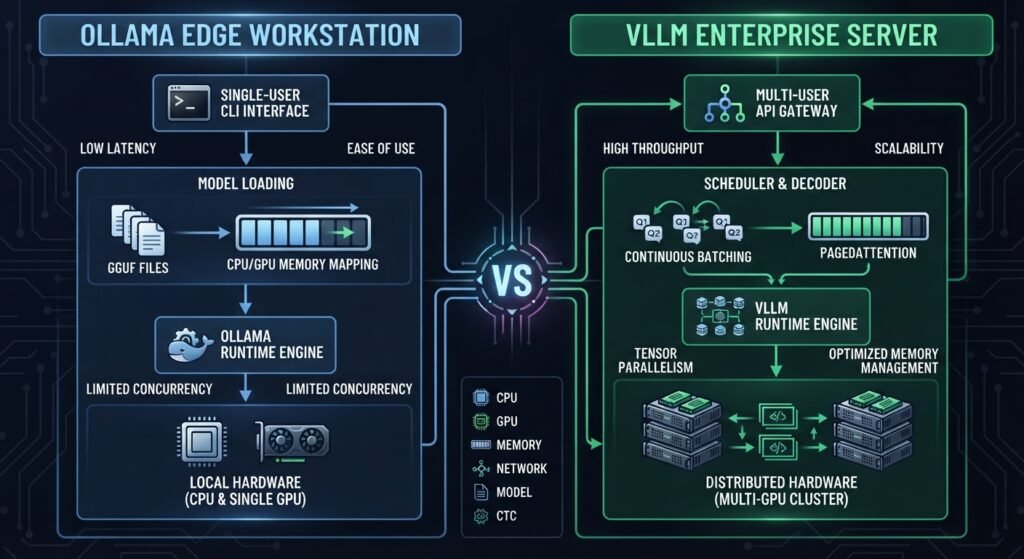
| Feature / Trait | Ollama (Edge & Workstations) | vLLM (Private Enterprise Servers) |
| Primary Use Case | Local developer testing, edge devices, consumer hardware. | Production API microservices, multi-tenant platforms, heavy concurrency. |
| Inference Engine | llama.cpp wrapper. | Custom Python/C++/CUDA PagedAttention engine. |
| Supported File Formats | GGUF (Single-file quantized containers). | Safetensors, HuggingFace weights, AWQ, GPTQ, FP8. |
| Memory Optimization | CPU/GPU RAM offloading via GGUF $mmap$. | PagedAttention (Virtual Memory allocation for KV cache). |
| Concurrency Method | Sequential or basic queueing. | Continuous Batching & Chunked Prefill. |
| Multi-GPU Scaling | Limited layer splitting across consumer GPUs. | Tensor Parallelism, Pipeline Parallelism, Expert Parallelism. |
Option 1: Deploying Edge-Ready Local LLMs with Ollama
Ollama bundles model management, quantization runtimes, and local serving into a single binary. It is ideal for deploying on Apple Silicon MacBooks, NVIDIA Jetson modules, or Linux edge nodes.
Step 1: Installing and Configuring Ollama
Install Ollama via the command line on macOS, Linux, or WSL2:
Bash
# Install Ollama on Linux or WSL2
curl -fsSL https://ollama.com/install.sh | sh

# Configure environment variables to listen on all local network interfaces
export OLLAMA_HOST=0.0.0.0:11434
export OLLAMA_MODELS=/mnt/nvme/ollama_models
Step 2: Running Quantized Models (Q4_K_M)
To run a model on edge hardware with limited VRAM, use quantized GGUF variants:
Bash
# Pull and run Llama 3.2 3B optimized for edge devices
ollama run llama3.2:3b

# Alternatively, import a custom GGUF model directly from HuggingFace
ollama run hf.co/unsloth/Qwen2.5-Coder-7B-Instruct-GGUF:Q4_K_M
Step 3: Customizing Models with Modelfiles
Customize model behavior, system prompts, and context parameters by creating a Modelfile:
Dockerfile
# File: Modelfile
FROM llama3.2:3b

# Set temperature and context window parameters
PARAMETER temperature 0.2
PARAMETER num_ctx 8192

# Define system message boundary
SYSTEM """
You are an edge AI technical assistant operating in a secure, air-gapped private environment.
Provide concise, accurate responses without external assumptions.
"""
Build and run your custom local edge model:
Bash
ollama create custom-edge-agent -f ./Modelfile
ollama run custom-edge-agent
Option 2: Deploying Enterprise-Grade LLMs with vLLM on Private Servers
When scaling local models on enterprise private servers with dedicated GPUs (NVIDIA A100, H100, L40S, RTX 4090), vLLM provides high throughput by managing Key-Value (KV) cache memory dynamically using PagedAttention.

Set up vLLM inside an isolated PyTorch environment with CUDA support:
Bash
# Create and activate virtual environment
python3 -m venv vllm-env
source vllm-env/bin/activate

# Install vLLM with CUDA accelerated dependencies
pip install vllm torch
Step 2: Serving Models with Tensor Parallelism
Deploy a 70B parameter model across 4 GPUs using Tensor Parallelism:
Bash
python3 -m vllm.entrypoints.openai.api_server \
    --model meta-llama/Llama-3.3-70B-Instruct \
    --tensor-parallel-size 4 \
    --gpu-memory-utilization 0.90 \
    --max-model-len 16384 \
    --port 8000 \
    --host 0.0.0.0
Step 3: Enabling Advanced Memory and Throughput Flags
Optimize server throughput under heavy request concurrency using FP8 quantization and chunked prefill:
Bash
python3 -m vllm.entrypoints.openai.api_server \
    --model Qwen/Qwen2.5-32B-Instruct-FP8 \
    --tensor-parallel-size 2 \
    --enable-chunked-prefill \
    --max-num-batched-tokens 2048 \
    --quantization fp8
Hardware Sizing & VRAM Calculation Guide
Understanding VRAM capacity requirements is vital when sizing private infrastructure:
$$\text{Required VRAM (GB)} \approx \left( \frac{\text{Parameters in Billions} \times \text{Bytes per Weight}}{1} \right) \times 1.25 + \text{KV Cache Allocation}$$
- 16-bit Precision (FP16): 2 Bytes per parameter.
- 8-bit Precision (INT8 / FP8): 1 Byte per parameter.
- 4-bit Quantization (GGUF / AWQ): 0.5 Bytes per parameter.
Sizing Rule of Thumb for a 8B Parameter Model:
├── Full Precision (FP16): ~16 GB VRAM minimum (Requires 24GB GPU)
├── 8-bit Quantized (INT8): ~8 GB VRAM minimum (Requires 12GB GPU)
└── 4-bit Quantized (Q4_K_M): ~4.5 GB VRAM minimum (Runs on 8GB Edge GPU)
Production Integration: OpenAI-Compatible REST API
Both Ollama and vLLM expose standardized OpenAI endpoints. This allows application teams to switch from cloud providers to local servers by updating API base URLs in standard client libraries:
Python
from openai import OpenAI

# Connect to your self-hosted local vLLM or Ollama instance
client = OpenAI(
    base_url="http://private-server-ip:8000/v1",  # Or http://localhost:11434/v1 for Ollama
    api_key="cannot-be-empty-use-local-key"
)

response = client.chat.completions.create(
    model="meta-llama/Llama-3.3-70B-Instruct",
    messages=[
        {"role": "system", "content": "You are a private enterprise search assistant."},
        {"role": "user", "content": "Summarize our internal Q3 engineering audit report."}
    ],
    temperature=0.1,
    max_tokens=512
)

print(response.choices[0].message.content)
Production Security and Hardening
- Network Isolation & Air-Gapping: Isolate local model servers inside isolated VPC subnets or private VLANs with no direct public internet egress.
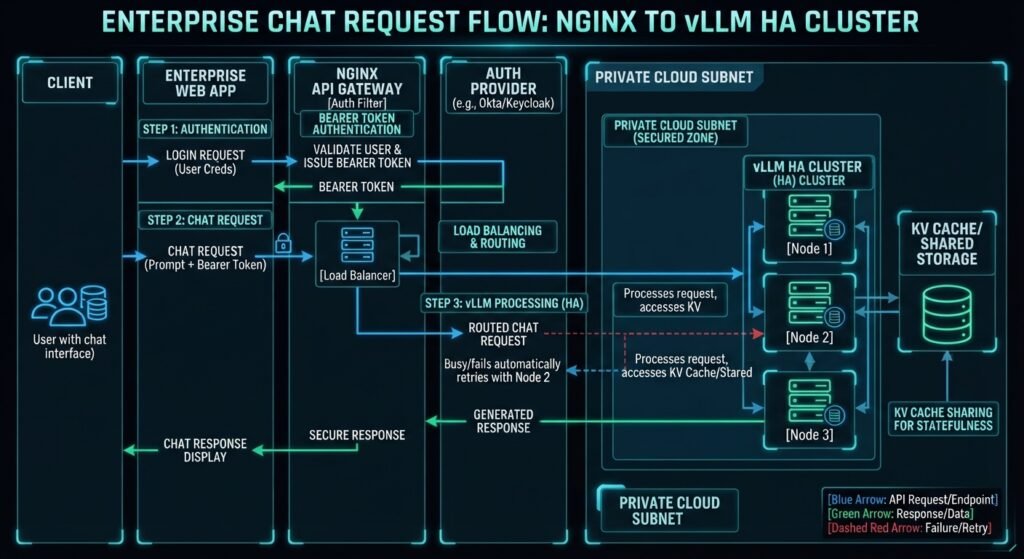
- Reverse Proxy Authentication: Place Nginx, Traefik, or Cloudflare Tunnels in front of Ollama or vLLM to enforce API token authorization, TLS encryption, and rate limiting.
- Containerized Deployments: Package local inference pipelines into Docker or Kubernetes pods to automate health checks, container restarts, and GPU node auto-scaling.
Conclusion
Deploying local LLMs on edge devices and private servers using Ollama & vLLM bridges the gap between high-performance AI capabilities and strict enterprise data governance. By pairing Ollama for edge nodes and developer workstations with vLLM for high-throughput private server clusters, organizations eliminate cloud vendor lock-in, slash operational API costs, and guarantee total data privacy for mission-critical AI workloads.
Frequently Asked Questions (FAQs)
What is the primary difference between Ollama and vLLM?
Ollama is built on llama.cpp and optimized for simplicity, low-memory edge deployments, and single-user workflows using GGUF quantization. vLLM is an enterprise-grade inference engine designed for multi-GPU private servers that handles high concurrent user requests through PagedAttention and Continuous Batching.
Can I run Ollama or vLLM on machines without a dedicated GPU?
Yes. Ollama natively supports CPU-only execution (or system RAM offloading on Apple Silicon Macs) via GGUF memory-mapping. However, while vLLM has added initial CPU backend support, it performs best on server-grade NVIDIA or AMD GPUs.
How do quantized models like Q4_K_M affect accuracy?
4-bit GGUF quantization (Q4_K_M) reduces model VRAM and disk requirements by up to 70% while retaining over 95–98% of the full precision (FP16) model’s reasoning capabilities, making it an ideal trade-off for edge devices.
1 thought on “learn Deploying Local LLMs on Edge Devices and Private Servers Using Ollama & vLLM”