
In multi-tenant Software-as-a-Service (SaaS) environments, delivery speed cannot come at the expense of application stability. With modern cloud software teams releasing code multiple times a day, relying on manual Quality Assurance (QA) creates severe delivery bottlenecks, introduces regression risks, and degrades end-user experience.
Mastering automating software testing workflows for SaaS applications allows engineering organizations to build resilient continuous integration and continuous deployment (CI/CD) feedback loops. By automating unit checks, API contracts, cross-browser interactions, and multi-tenant security boundaries, software teams validate feature releases rapidly while maintaining platform availability. This step-by-step guide provides an actionable framework to design, implement, and scale an automated QA ecosystem tailored specifically for SaaS architectures.
Key Takeaways automating software testing workflows for SaaS applications
- Shift-Left Quality Assurance: Early integration of automating software testing workflows for SaaS applications in the development cycle catches defects at the pull-request stage before they reach production.
- Balanced Test Pyramid Strategy: A sustainable automation pipeline maintains a heavy base of fast unit tests, a robust middle layer of API and contract validations, and a targeted top layer of end-to-end (E2E) user journey tests.
- Multi-Tenant Data Isolation: Automated SaaS testing requires isolated, dynamic test-data generation strategies to prevent data contamination across simulated tenant environments.
- CI/CD Pipeline Synchronization: Automated test suites must run in parallel within modern CI/CD tools to deliver near-instant feedback to software engineers.
The Unique Challenges of SaaS Test Automation
Automating tests for on-premises software differs fundamentally from validating cloud-native SaaS platforms. SaaS architectures present distinct operational complexities:
┌────────────────────────────────────────────────────────────────────────┐
│                   TRADITIONAL QA VS. SAAS TEST AUTOMATION              │
├───────────────────────────────┬────────────────────────────────────────┤
│ TRADITIONAL QA                │ SAAS TEST AUTOMATION                   │
├───────────────────────────────┼────────────────────────────────────────┤
│ Single-tenant environments    │ Complex multi-tenant data isolation    │
│ Monolithic release cycles     │ Continuous deployment (multiple/day)   │
│ Static test database snapshots│ Dynamic API integrations & webhooks   │
│ Manual environment setups     │ Ephemeral, infrastructure-as-code environments│
└───────────────────────────────┴────────────────────────────────────────┘
When automating software testing workflows for SaaS applications, teams must address zero-downtime deployment requirements, feature flag variations, asynchronous microservice messaging, and third-party API dependencies.
Designing a SaaS Test Automation Pyramid
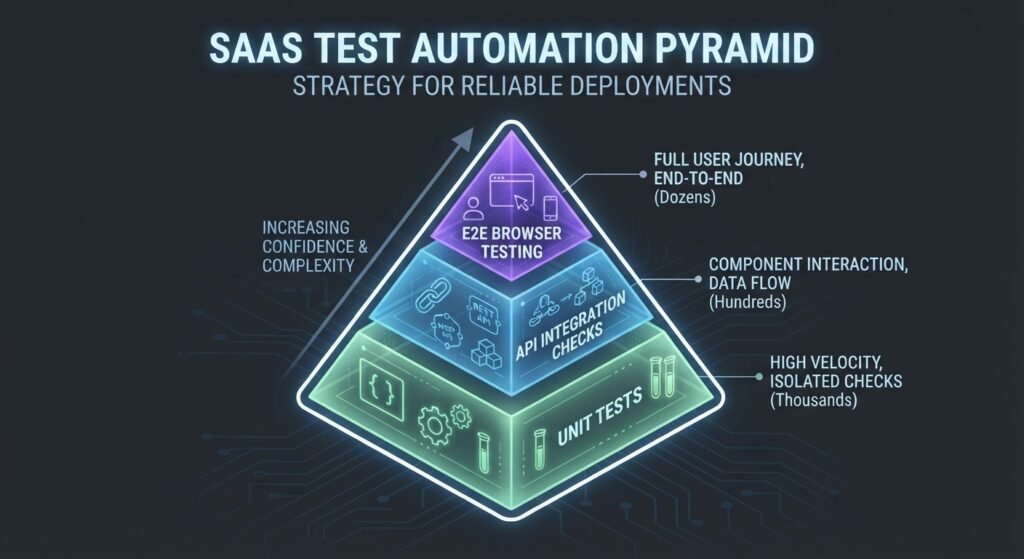
A common pitfall in SaaS QA is creating an inverted test pyramid—relying heavily on slow, fragile UI-driven tests. A successful automation strategy structures test coverage into three distinct layers:
                      /\
                     /  \
                    / E2E\          <- 10% UI / Critical User Journeys
                   /------\
                  /  API   \        <- 30% Microservices & Contract Tests
                 /----------\
                /  Unit &    \      <- 60% Component & Business Logic
               /  Component   \
              ------------------
- Unit & Component Layer (60%): Validates isolated functions, business logic components, and UI state models. These run in milliseconds and provide immediate developer feedback.
- API & Integration Layer (30%): Tests REST/GraphQL endpoints, microservice communication, database transactions, and tenant authorization rules.
- End-to-End (E2E) Browser Layer (10%): Validates primary user workflows (such as user signup, subscription billing checkout, and critical dashboard actions) across target browsers.
Step-by-Step: Automating Software Testing Workflows for SaaS Applications
Follow these six steps to establish an end-to-end automated testing strategy for your SaaS platform:
Step 1: Establish Test Data Management and Tenant Isolation
SaaS applications require strict data isolation during test runs. Avoid using static database dumps, which lead to flaky tests when tests run in parallel.
- Implement Factory Patterns: Use dynamic data generation libraries (such as FactoryBot or Faker) to instantiate fresh, isolated tenant accounts for every test suite execution.
- Database Teardown Hooks: Ensure every automated test run executes setup and teardown routines to clean up created entities and prevent state leakage.
Step 2: Implement API and Service-Level Test Automation
API tests run significantly faster and are far less prone to flakiness than UI-driven tests.
- Write automated API test suites using frameworks like Playwright API Request Context, Postman/Newman, or REST Assured.
- Validate JSON schema contracts, HTTP response codes, payload structures, and multi-tenant authorization boundaries (e.g., verifying Tenant A cannot access Tenant B’s endpoints).
Step 3: Build Resilient End-to-End (E2E) Browser Workflows
For essential UI user journeys, build automated web tests using modern automation frameworks such as Playwright or Cypress.
- Adopt the Page Object Model (POM): Abstraction layers separate UI page selectors from test logic, minimizing script maintenance when UI layouts change.
- Use Resilient Locators: Prefer user-facing attributes or dedicated test IDs (e.g.,
data-testid="submit-btn") over fragile, DOM-dependent XPath or CSS selectors.
JavaScript
// Example: Resilient Playwright E2E Test for SaaS Login
import { test, expect } from '@playwright/test';

test('Tenant user can log in successfully', async ({ page }) => {
  await page.goto('https://app.saasplatform.com/login');

  // Using accessible data-testid attributes for stability
  await page.getByTestId('email-input').fill('admin@tenant-alpha.com');
  await page.getByTestId('password-input').fill('SecurePassword123!');
  await page.getByTestId('login-button').click();

  // Verify successful redirection to tenant dashboard
  await expect(page).toHaveURL(/.*\/dashboard/);
  await expect(page.getByTestId('welcome-banner')).toContainText('Tenant Alpha Workspace');
});
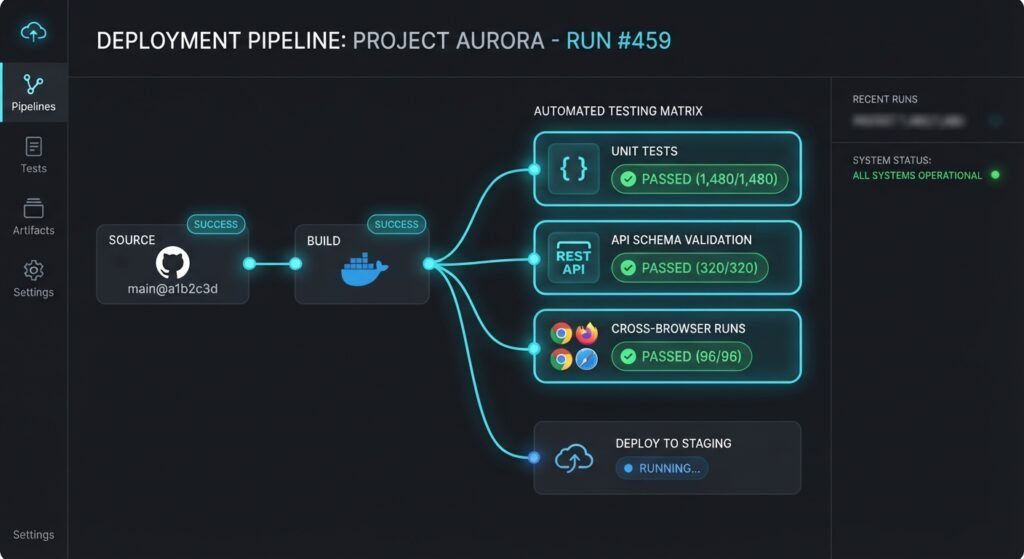
Step 4: Integrate Test Suites into the CI/CD Pipeline
Connect your test automation repository directly into your continuous integration tools (such as GitHub Actions, GitLab CI, or CircleCI).
- Pull Request Trigger: Execute lightweight linting, unit tests, and core API smoke tests on every developer code commit.
- Staging / Pre-Merge Trigger: Trigger full integration and cross-browser regression suites before code merges into production.
Best Practices for Maintaining Test Stability at Scale
Scaling automating software testing workflows for SaaS applications requires proactive maintenance to prevent test flakiness and high execution costs.
┌─────────────────────────────────────────────────────────────────────────────────┐
│                     SAAS TEST AUTOMATION BEST PRACTICES                         │
├──────────────┬──────────────────┬──────────────────┬────────────────────────────┤
│ PRACTICE 1   │ PRACTICE 2       │ PRACTICE 3       │ PRACTICE 4                 │
│ Parallel     │ Dynamic Auto-    │ Mock Third-Party │ Continuous Flaky           │
│ Test Grid    │ Waiting          │ Gateways         │ Test Quarantining          │
└──────────────┴──────────────────┴──────────────────┴────────────────────────────┘
- Leverage Parallel Test Execution: Run test suites concurrently across cloud grid nodes (e.g., BrowserStack or Selenium Grid) to reduce total build time from hours to minutes.
- Eliminate Hardcoded Sleep Timers: Replace explicit time delays (e.g.,
sleep(5)) with dynamic state assertions that wait for specific DOM elements, network responses, or API signals. - Mock Third-Party External Services: Avoid calling production payment gateways (like Stripe) or email providers directly during automated runs; use mock servers or sandbox endpoints to ensure deterministic results.
- Quarantine Flaky Tests: Automatically flag and quarantine tests that exhibit intermittent failures, preventing them from blocking CI/CD pipelines while QA engineers investigate the root cause.
To explore how automated testing integrates with broader cloud software infrastructure, read our guide on [Monolith vs Microservices Architecture]([Internal Link: Insert relevant internal URL here with anchor text]).
For web accessibility and standard browser automation practices, consult the official W3C Web Quality Assurance Standards.
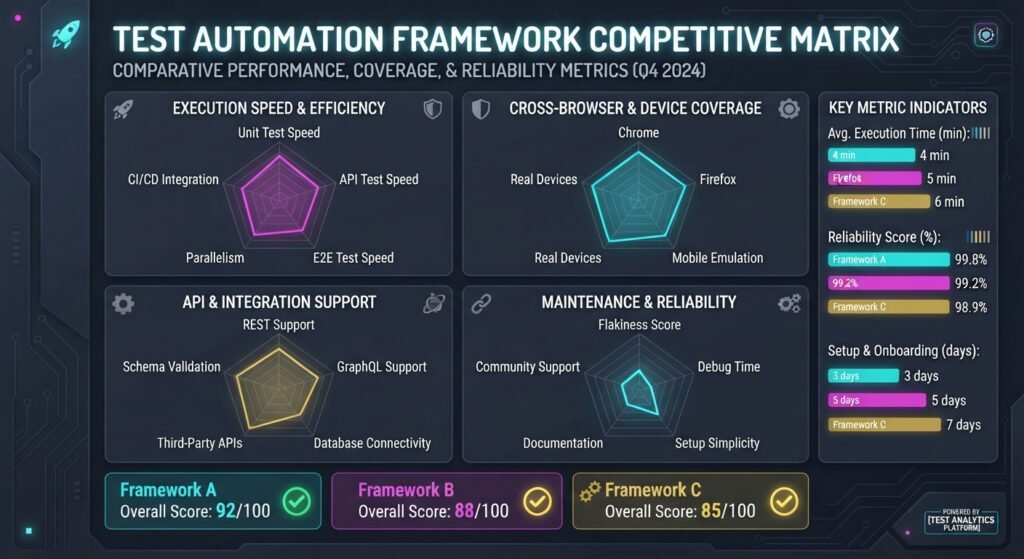
SaaS Test Automation Framework Comparison
| Framework | Primary Target Layer | Supported Languages | Parallel Execution | Best SaaS Use Case |
|---|---|---|---|---|
| Playwright | API & E2E Browser | TypeScript, JavaScript, Python, C#, Java | Built-in | Modern single-page SaaS web apps & microservice APIs |
| Cypress | Component & E2E | JavaScript, TypeScript | Cloud Dashboard | Developer-centric component and frontend interaction tests |
| Postman / Newman | REST API & Integration | JavaScript | Command-Line Runner | Rapid API contract and authorization testing |
| Selenium WebDriver | Cross-Browser E2E | Java, C#, Python, Ruby, JavaScript | Grid Infrastructure | Legacy enterprise web applications needing legacy browser support |
| k6 | Performance & Load | JavaScript | Native Cloud CLI | Validating SaaS multi-tenant concurrency under heavy load |
Conclusion
Successfully implementing automating software testing workflows for SaaS applications transforms quality assurance from a release bottleneck into a fast, reliable competitive advantage. By structuring a balanced test automation pyramid, isolating multi-tenant test data, leveraging API-first validations, and seamlessly integrating automated suites into CI/CD pipelines, software engineering teams achieve rapid delivery cycles without compromising platform stability. Begin by automating core regression paths today to build a scalable, future-proof QA ecosystem.
Frequently Asked Questions (FAQs)
What is the most effective approach to automating software testing workflows for SaaS applications?
The most effective approach is prioritizing an API-first strategy alongside a balanced test pyramid. Automate business logic at the unit and API levels first to gain fast execution speeds, reserving end-to-end UI browser automation for critical customer paths like signup and billing.
How do you handle multi-tenant data privacy during automated SaaS testing?
Multi-tenant data privacy is managed by dynamically provisioning isolated tenant accounts and test databases for every test run. Utilizing factory patterns and teardown scripts ensures that automated tests never mutate or read live production data.
How frequently should automated SaaS test suites run?
Unit and API integration tests should run on every pull request commit. Full end-to-end regression suites and cross-browser execution grids should run during staging deployments, nightly scheduled jobs, or prior to final production releases.
automating software testing workflows for SaaS applications automating software testing workflows for SaaS applications automating software testing workflows for SaaS applications automating software testing workflows for SaaS applications automating software testing workflows for SaaS applications automating software testing workflows for SaaS applications automating software testing workflows for SaaS applications automating software testing workflows for SaaS applications
1 thought on “Step-by-Step Guide: Automating Software Testing Workflows for SaaS Applications”