
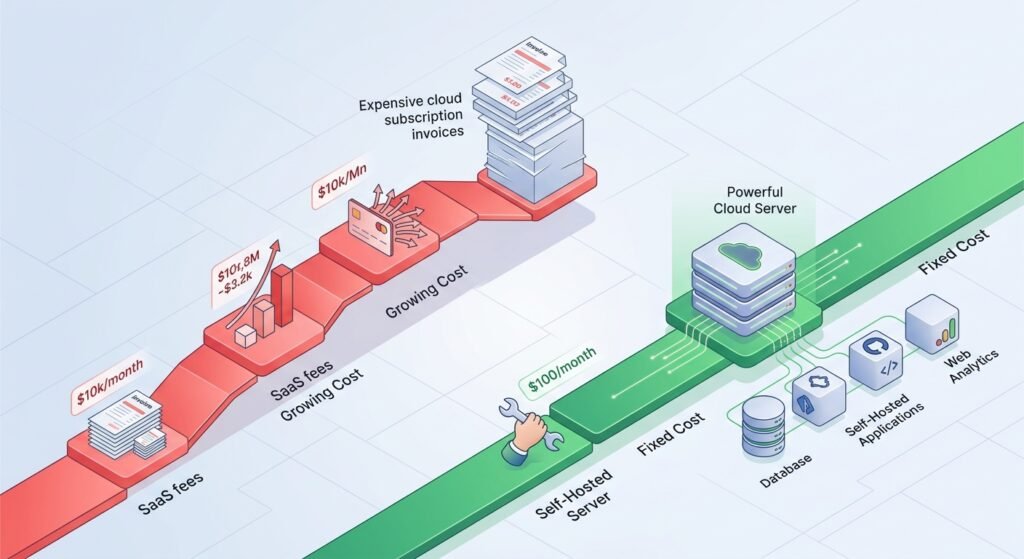
Modern businesses and tech teams face a common financial leak: subscription bloat. From project management software to automation engines and analytics platforms, recurring monthly license fees quietly eat away at operating margins.
As proprietary vendors continuously raise per-user pricing, forward-thinking organizations are turning to self-hosted software and open-source models. Modern open source saas alternatives now offer enterprise-grade reliability, sleek user interfaces, and modular scalability without the recurring price tag.
By choosing self-hosted or open-core solutions, you cut per-seat licensing costs while taking full control over data security, compliance, and custom workflows. Here are the top seven open-source platforms ready to replace your most expensive SaaS subscriptions in 2026.
Key Takeaways
- Drastic Cost Reduction: Moving core business tools to open source saas alternatives can reduce software expenses by 70% to 90%, trading recurring per-user fees for fixed infrastructure costs.
- Full Data Ownership: Self-hosting ensures your sensitive operational data stays on your infrastructure, simplifying GDPR, HIPAA, and industry compliance.
- No Vendor Lock-In: Open-source architectures let you modify source code, build custom integrations, or migrate platforms whenever business needs evolve.
- Modern Parity: Modern open-source platforms match or exceed the user experience and feature sets of proprietary platforms like Notion, Zapier, and Jira.
1. AppFlowy (Alternative to Notion)
For teams relying on Notion for document collaboration, internal wikis, and project tracking, growing team size brings steep monthly invoices. AppFlowy delivers a privacy-first, open-source workspace built on Flutter and Rust, providing exceptional speed and offline capability.
┌─────────────────────────────────────────────────────────┐
│                      APPFLOWY HUB                       │
├───────────────────┬─────────────────┬───────────────────┤
│    Kanban Board   │   Nested Wikis  │  Data Privacy     │
│   (Task Tracking) │  (Documentation)│ (Local/Self-Host) │
└───────────────────┴─────────────────┴───────────────────┘
Key Capabilities
- Local-First Architecture: Data resides on your local machine or self-hosted server rather than third-party cloud instances.
- Custom Building Blocks: Highly configurable views including Kanban boards, nested document trees, and grid tables.
- Native Cross-Platform Speed: Lightweight native desktop and mobile applications running on Rust.
Why Replace Notion?
Notion’s team tiers quickly escalate as your headcount grows. AppFlowy gives you visual parity, customized databases, and total offline access with zero per-seat subscription charges.
2. n8n (Alternative to Zapier & Make)
Workflow automation is vital for modern operations, but proprietary platforms charge by the task. Running high-volume data pipelines on Zapier can cost hundreds to thousands of dollars every month. n8n is a fair-code, node-based automation engine that lets you build complex multi-step workflows with infinite executions.
[ Webhook Trigger ] ──► [ AI Processing Node ] ──► [ Database / CRM Update ]
Key Capabilities
- Visual Workflow Builder: Drag-and-drop interface supporting over 400 pre-built integrations.
- Native Custom Code: Inject custom JavaScript or Python directly into nodes for complex logic.
- Unlimited Executions: Host it on a basic Virtual Private Server (VPS) and run millions of automation tasks without added fees.
Why Replace Zapier?
Instead of capping your operations with monthly task limits, n8n lets you scale high-frequency automations at the flat cost of your hosting server.
3. Plane (Alternative to Jira & Linear)
Managing complex engineering workflows and software roadmaps often means paying steep license fees for tools like Jira or Linear. Plane is a modern project tracking tool designed for agile software development teams.
Key Capabilities
- Flexible Project Views: Toggle seamlessly between List, Kanban board, Calendar, and Gantt roadmap views.
- Cycles & Modules: Group tasks into development sprints (Cycles) and break down features into epics (Modules).
- Extensible Ecosystem: Integrates directly with GitHub, GitLab, and Slack for streamlined developer handoffs.
Why Replace Jira?
Plane delivers a clean interface without the bloat and slow load times of enterprise legacy tools. It keeps software tracking centered on developer speed.
4. Coolify (Alternative to Heroku & Vercel)
Cloud hosting platforms make deployment simple, but bandwidth overages and compute markups can create unpredictable monthly bills. Coolify acts as an open-source, self-hosted PaaS (Platform as a Service) that turns any bare-metal server or VPS into your own personal Heroku or Vercel.
Key Capabilities
- One-Click Deployments: Easily launch applications, static sites, and databases (PostgreSQL, MongoDB, Redis) with direct Git integration.
- Multi-Server Management: Connect multiple cloud providers (Hetzner, AWS, DigitalOcean) under a single management dashboard.
- Automatic SSL & Proxying: Built-in Let’s Encrypt SSL certificates and automated reverse proxy configuration out of the box.
Why Replace Vercel/Heroku?
Coolify lets you run dozens of web apps on a single $20/month VPS instead of paying per-project or per-build minute pricing on proprietary platforms.
5. Plausible Analytics (Alternative to Google Analytics 4)
Google Analytics 4 (GA4) is complex, heavy on script weight, and presents privacy compliance challenges under strict regulations like GDPR. Plausible Analytics provides a lightweight, privacy-focused open source saas alternative for tracking site metrics.
| Feature | Google Analytics 4 | Plausible Analytics |
| Script Size | ~45 KB (Slower page load) | < 1 KB (Ultra lightweight) |
| Privacy Compliance | Requires complex consent banners | GDPR, CCPA & PECR compliant out of the box |
| Data Ownership | Controlled by Google | 100% Owned by You (Self-hosted) |
| Learning Curve | High (Complex UI) | Low (Single-page dashboard) |
Key Capabilities
- Cookie-Free Tracking: Tracks essential site metrics without harvesting personal identification data, eliminating intrusive cookie banners.
- Lightweight Footprint: Script loads in milliseconds, preserving site performance and Core Web Vitals score.
- Clean Metrics: Visualizes top pages, referral sources, entry pages, and custom goal conversions in one intuitive interface.
Why Replace GA4?
Plausible gives you actionable web traffic insights without slowing down your site or sacrificing visitor privacy.

6. Cal.com (Alternative to Calendly)
Scheduling apps are essential for sales, consulting, and hiring, but per-seat SaaS costs add up across large teams. Cal.com is an open-source scheduling infrastructure designed for seamless calendar management.
[ Client Selects Slot ] ──► [ Cal.com Engine ] ──► [ Syncs Google/Outlook/Apple Cal ]
Key Capabilities
- Multi-Calendar Sync: Connects with Google Calendar, Microsoft Outlook, and Apple Calendar to eliminate double-bookings.
- Built-in Workflows: Automate SMS/email reminders, follow-ups, and booking confirmation sequences.
- Native Payment Gateways: Collect payments for consultation slots using Stripe integrations.
Why Replace Calendly?
Cal.com gives you complete control over your scheduling branding, customized booking logic, and white-label embedding options without per-user subscription fees.
7. Formbricks (Alternative to Typeform)
Collecting user feedback, product surveys, and lead intake often relies on platforms like Typeform, which enforce strict submission caps on lower-tier plans. Formbricks offers a privacy-first, open-source survey suite built specifically for modern product teams.
Key Capabilities
- In-App & Micro-Surveys: Trigger targeted feedback prompts directly inside your web or mobile app based on user behavior.
- Granular User Targeting: Survey specific customer cohorts based on usage attributes and actions.
- Data Privacy: Keep sensitive customer feedback stored securely on your own servers.
Why Replace Typeform?
Formbricks eliminates low submission limits and lets you integrate customer feedback pipelines directly into your core product stack.

Strategic Comparison: Proprietary SaaS vs. Open-Source Alternatives
| SaaS Tool | Open-Source SaaS Alternative | Primary Business Benefit |
| Notion | AppFlowy | Privacy-first workspace, offline access, fast desktop apps |
| Zapier / Make | n8n | Unlimited automation tasks, custom node coding |
| Jira / Linear | Plane | Lightweight agile issue tracking, developer focus |
| Vercel / Heroku | Coolify | Flat-rate hosting deployment on your own VPS |
| Google Analytics | Plausible Analytics | Cookie-free tracking, fast load times, GDPR compliance |
| Calendly | Cal.com | Custom white-label scheduling infrastructure |
| Typeform | Formbricks | In-app user micro-surveys without submission limits |
Transitioning to Open Source: An Actionable Implementation Plan
Switching from proprietary cloud services to open source saas alternatives doesn’t have to happen overnight. Use this staged migration roadmap:
- Audit Monthly SaaS Spend: List all active subscriptions, per-seat charges, and overage fees across departments.
- Select Low-Risk Targets First: Begin by migrating non-critical operational tools like web analytics (Plausible) or scheduling (Cal.com).
- Provision Reliable Infrastructure: Secure a Virtual Private Server (VPS) from established providers (e.g., DigitalOcean, Hetzner, AWS).
- Deploy via Containers: Use Docker Compose or PaaS managers like Coolify to simplify deployment, automated updates, and routine database backups.
- Train Team Members: Ensure team adoption by documenting new internal workflows and highlighting improved platform speed and privacy.
Conclusion
Software subscriptions are one of the fastest-growing operational costs for modern businesses. By adopting open source saas alternatives, you can eliminate per-seat licensing fees, secure full control over your operational data, and tailor your tools to your exact workflow needs.
Start by picking one high-cost SaaS tool in your current tech stack—like Zapier or Notion—and testing its open-source equivalent in a staging environment. The savings and operational independence will quickly transform how your company scales.
Frequently Asked Questions (FAQs)
Are open source saas alternatives completely free to run?
While open-source software source code is free to download, modify, and use, self-hosting requires basic cloud server infrastructure (such as a VPS). However, a flat $20/month hosting setup can often power several tools that would otherwise cost hundreds in SaaS subscription fees.
Do I need advanced coding skills to host open source software?
Not anymore. Platform managers like Coolify, alongside container tools like Docker Compose, make deploying open-source applications as straightforward as filling out a few configuration fields. Most tools also offer optional paid managed cloud tiers if you prefer to skip self-hosting.
How do open source software platforms handle data security?
Data security on self-hosted software depends on your server configuration. Because you control the hosting environment, your data isn’t subject to third-party SaaS vendor breaches or unexpected policy changes. You can enforce custom encryption, access controls, and firewall rules directly.
What happens if an open-source project stops being updated?
Top-tier open-source projects are backed by active developer communities and open-core business models. Because the source code remains accessible under open licenses, your team retains the legal right to maintain, fork, or host the code indefinitely, protecting you from sudden product shutdowns.
1 thought on “Top 7 Open Source SaaS Alternatives To save in 2026”