
Encountering an HTTP 429 Too Many Requests status code during a critical production data sync or automated workflow can halt applications instantly. As software architectures transition to cloud microservices and third-party SaaS integrations, handling API rate limits gracefully has become an essential requirement for resilient system design.
Understanding how to fix API rate limit errors requires analyzing why API providers enforce request ceilings, interpreting server response headers, and implementing client-side strategies like exponential backoff, request queuing, and caching. This guide explores the underlying causes of rate limiting and provides actionable engineering solutions to resolve throttling issues.
Key Takeaways
- Decode the HTTP 429 Response: Look for
Retry-AfterandX-RateLimit-*headers to determine exact wait times and quota limits instead of retrying blindly. - Implement Exponential Backoff with Jitter: Double retry intervals between failed requests and add randomized delays to prevent retry storms.
- Cache API Responses Aggressively: Store frequently accessed, slow-changing data in Redis or local memory to eliminate redundant API calls.
- Decouple Traffic with Client Queues: Use rate-limited background queues (such as RabbitMQ, BullMQ, or Celery) to flatten request spikes.
What Are API Rate Limit Errors (HTTP 429)?
An API rate limit error—most commonly signaled by the HTTP 429 Too Many Requests response code—indicates that a client application sent more requests within a given timeframe than the server allows.
┌─────────────────────────────────────────────────────────────────┐
│                 HTTP 429 RATE LIMIT RESPONSE                    │
├─────────────────────────────────────────────────────────────────┤
│ Client Request ──> [API Gateway / Rate Limiter]                 │
│                          │                                      │
│                          ├── Threshold Exceeded? ──> YES        │
│                          │                                      │
│                          ▼                                      │
│ Client <── 429 Too Many Requests (Retry-After: 60)              │
└─────────────────────────────────────────────────────────────────┘
API providers enforce rate limits to protect infrastructure against denial-of-service (DoS) attacks, ensure fair resource distribution among multi-tenant users, and manage infrastructure compute costs.
Common Causes of API Rate Limit Errors
To resolve throttling errors effectively, engineers must first identify the root cause of high request volumes:
┌─────────────────────────────────────────────────────────────────────────────────┐
│                    PRIMARY CAUSES OF API RATE LIMITS                            │
├──────────────┬──────────────────┬──────────────────┬────────────────────────────┤
│ CAUSE 1      │ CAUSE 2          │ CAUSE 3          │ CAUSE 4                    │
│ Polling vs   │ Parallel Thread  │ Missing Cache    │ Multi-Tenant /             │
│ Webhooks     │ Bursts           │ Layers           │ Shared IP NATs             │
└──────────────┴──────────────────┴──────────────────┴────────────────────────────┘
- Tight Loops & Polling: Continuously querying an API endpoint in a short loop to check for status updates quickly consumes allocated request quotas.
- Unregulated Parallel Processing: Spawning dozens of concurrent worker threads without rate-governing mechanics causes traffic spikes that trigger burst thresholds.
- Lack of In-Memory Caching: Requesting identical, static dataset resources repeatedly wastes daily quota allowances.
- Shared IP / NAT Gateways: When multiple instances or VPN users share an outbound IP address, per-IP rate limits penalize all services behind that shared address.
To see how underlying microservice architectures handle traffic distribution and network routing, review our analysis on [Monolith vs Microservices Architecture]([Internal Link: Insert relevant internal URL here with anchor text]).
Step-by-Step Guide: How to Fix API Rate Limit Errors
┌─────────────────────────────────────────────────────────────────────────────────┐
│                 RATE LIMIT REMEDIATION WORKFLOW                                 │
├──────────────┬──────────────────┬──────────────────┬──────────────┬─────────────┤
│ STEP 1       │ STEP 2           │ STEP 3           │ STEP 4       │ STEP 5      │
│ Inspect      │ Implement        │ Add Client-Side  │ Leverage     │ Upgrade     │
│ Headers      │ Backoff + Jitter │ Request Queues   │ Caching      │ Tiers       │
└──────────────┴──────────────────┴──────────────────┴──────────────┴─────────────┘
Step 1: Inspect Rate Limit Headers
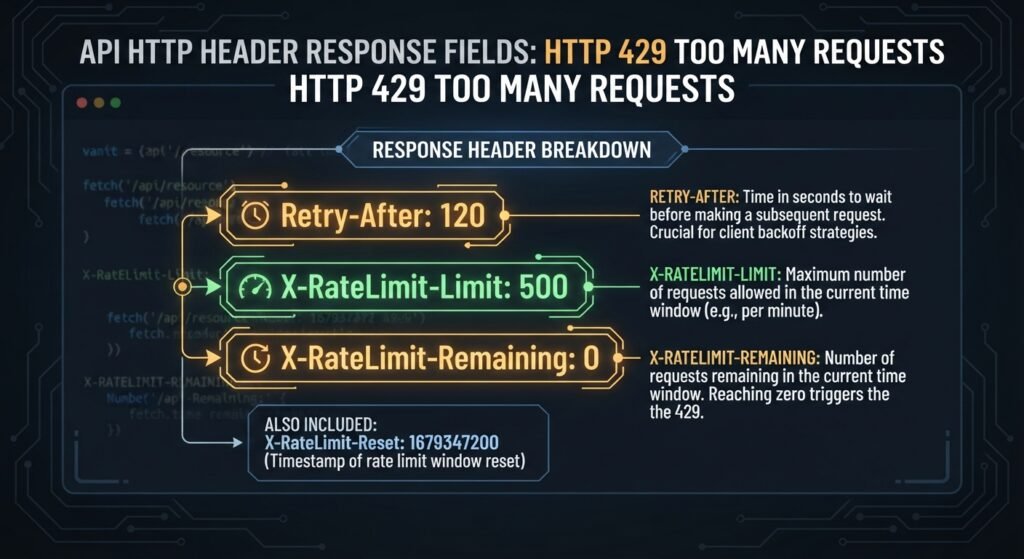
When an API rejects a request, inspect the response headers to identify the exact throttling parameters:
Retry-After: Specifies the exact time to wait (in seconds or an HTTP date) before making another request.X-RateLimit-Limit: The maximum number of requests allowed in the current window.X-RateLimit-Remaining: The remaining number of requests allowed in the active window.X-RateLimit-Reset: The UTC epoch timestamp indicating when the current rate limit window resets.
Step 2: Implement Exponential Backoff with Jitter
Never retry failed API requests immediately in a tight loop. Instead, implement Exponential Backoff, which progressively increases the wait time after each failed attempt (e.g., 1s, 2s, 4s, 8s).
Always add Jitter (a small, randomized time offset) to backoff intervals. Jitter prevents the “thundering herd problem,” where hundreds of concurrent instances retry requests simultaneously at identical intervals.
Python
import time
import random

def fetch_with_backoff(api_call, max_retries=5):
    for attempt in range(max_retries):
        try:
            return api_call()
        except RateLimitException as e:
            if attempt == max_retries - 1:
                raise e
            # Exponential backoff formula: (2^attempt) + randomized jitter
            base_delay = 2 ** attempt
            jitter = random.uniform(0, 1)
            total_delay = base_delay + jitter
            time.sleep(total_delay)
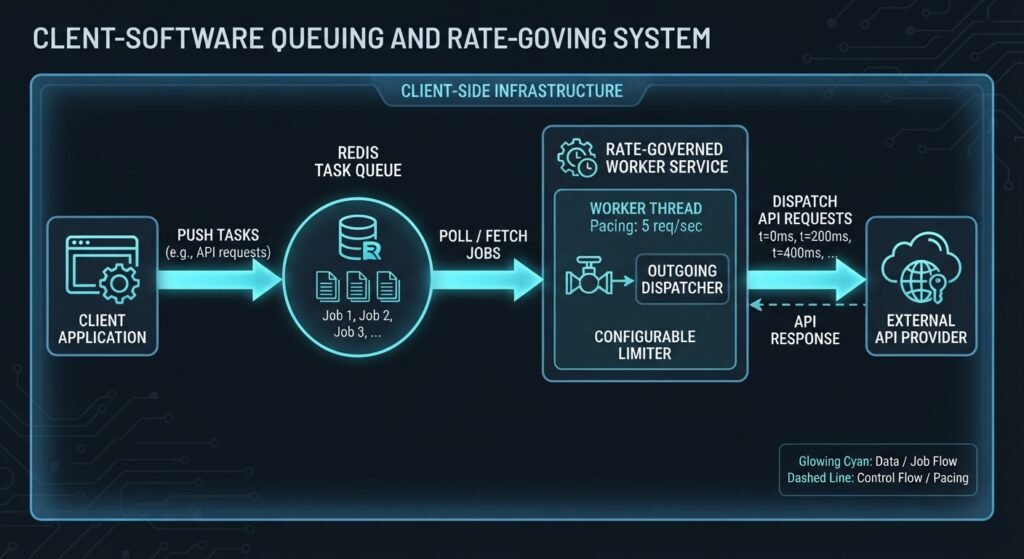
Step 3: Implement Client-Side Rate-Governed Queues
Control outgoing request volumes before requests leave your application network. Use queue processing libraries (such as Redis-backed BullMQ or Celery) configured with strict rate limits matching provider thresholds.
Step 4: Cache Responses and Use Batch Endpoints
Reduce overall API call volume by caching static or slow-changing data in memory (e.g., Redis or Memcached). Additionally, check whether the API provider supports batch or bulk endpoints, allowing you to create, update, or fetch multiple records in a single HTTP request rather than issuing hundreds of individual calls.
To discover strategies for optimizing backend databases and caching layers, read our guide on [How to Optimize SaaS Software Performance]([Internal Link: Insert relevant internal URL here with anchor text]).
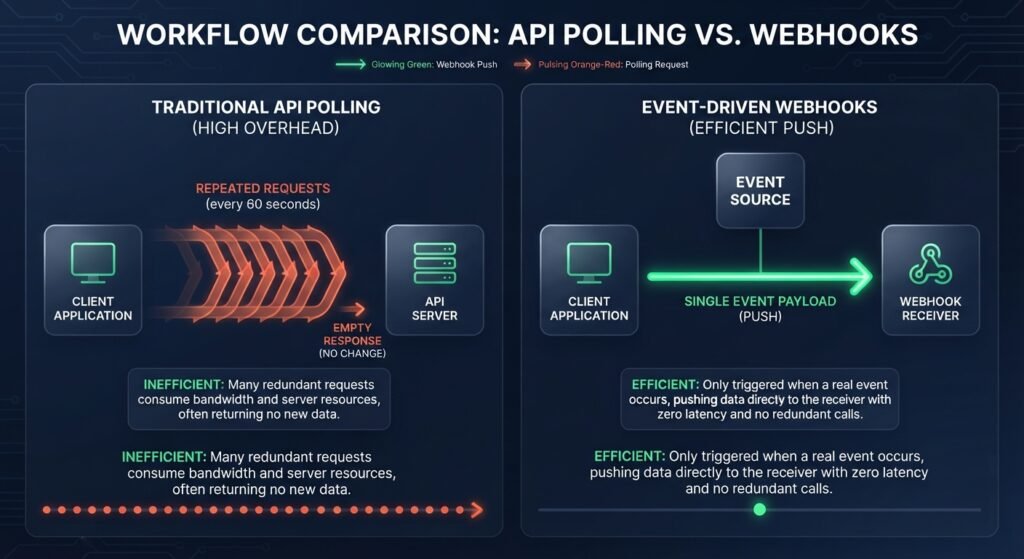
Step 5: Replace Polling with Webhooks
If your application polls an API every few seconds to monitor state changes, check if the provider supports Webhooks. Webhooks push real-time event payloads directly to your application endpoints when changes occur, eliminating the need for polling loops.
Strategy Comparison Matrix
| Mitigation Strategy | Problem Addressed | Implementation Effort | Rate Limit Reduction Impact |
| Exponential Backoff + Jitter | Immediate retry storms & 429 cascades | Low | High (Prevents failure loops) |
| Response Caching (Redis) | Redundant identical requests | Medium | Very High (30% – 80% reduction) |
| Client Request Queues | Sudden parallel traffic bursts | Medium | High (Flattens traffic spikes) |
| Webhooks over Polling | Continuous status polling loops | Medium to High | Dramatic (Eliminates polling calls) |
| Batch API Requests | High call volume for individual items | Low to Medium | High (Consolidates N calls to 1) |
Conclusion
Knowing how to fix API rate limit errors is vital for building resilient, production-ready software systems. By reading rate limit response headers, applying exponential backoff with jitter, setting up client-side request queues, and replacing polling mechanisms with event-driven webhooks, you can eliminate HTTP 429 errors. Implement these strategies across your integration layer to ensure smooth data synchronization and uninterrupted application uptime.
Frequently Asked Questions (FAQs)
What is the difference between API rate limiting and API throttling?
Rate limiting caps the maximum number of requests a client can make within a specified timeframe (e.g., 100 requests per minute). Throttling dynamically slows down or delays request processing (often by queuing requests or imposing temporary delays) when traffic approaches quota limits to prevent system overload.