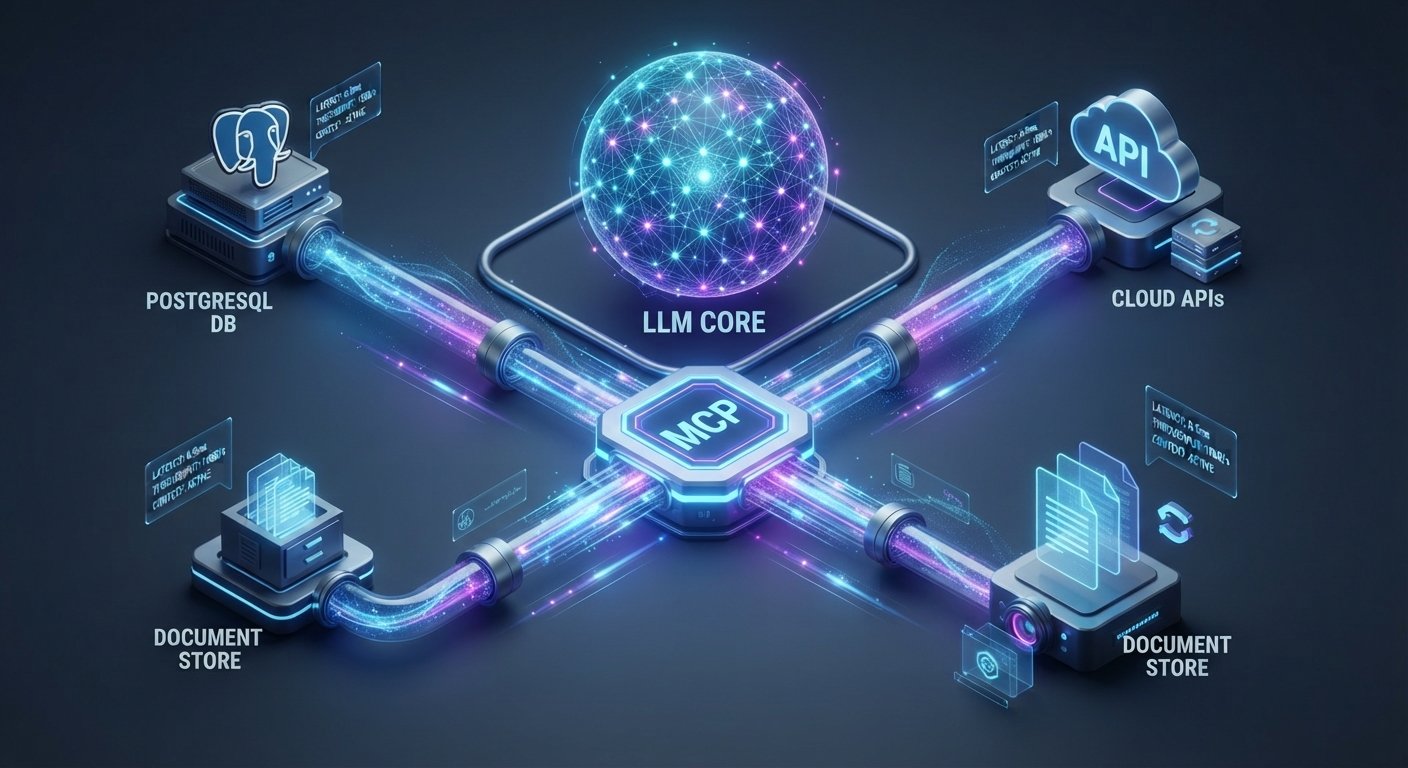
Connecting Large Language Models (LLMs) to private databases, internal APIs, and proprietary documents has traditionally required brittle, one-off integration pipelines. The Model Context Protocol integration guide provides developers and enterprise teams with a standardized blueprint to connect AI models to custom data sources.
Created as an open-source standard to unify how AI applications interface with external systems, the Model Context Protocol (MCP) replaces custom API wrappers with a universal protocol. By acting as a universal USB-C cable for AI systems, MCP enables real-time context retrieval, dynamic tool invocation, and bidirectional communication between AI hosts and secure data infrastructure.
Key Takeaways
- Universal Standard: MCP eliminates point-to-point custom integrations by establishing a unified JSON-RPC protocol between LLM applications and external data stores.
- Three Core Building Blocks: Systems interact via Resources (data reading), Tools (action execution), and Prompts (pre-configured contextual templates).
- Flexible Transports: Supports local communication over Standard I/O (stdio) and remote HTTP streaming using Server-Sent Events (SSE).
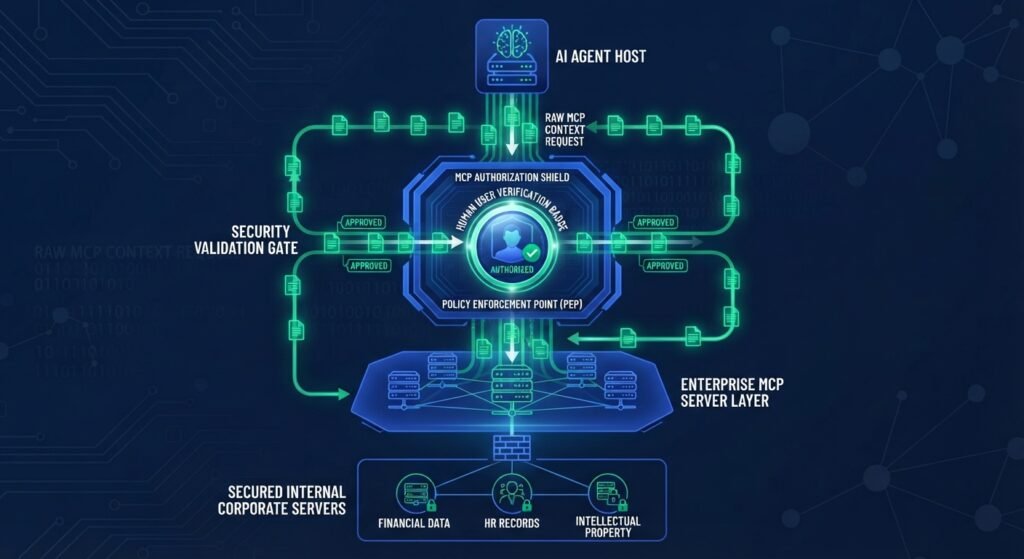
- Enterprise Security: Keeps credentials and raw data behind secure server boundaries while granting LLMs actionable context with fine-grained access control.
What is the Model Context Protocol (MCP)?
The Model Context Protocol (MCP) is an open specification designed to simplify how AI assistants and autonomous agents retrieve context and execute external functions. Prior to MCP, connecting an LLM application like Claude Desktop, VS Code AI plugins, or custom agent frameworks to a company’s PostgreSQL database, Google Drive, or Jira required custom glue code for every distinct pairing.
[ Traditional Setup ]
LLM App ─── (Custom Code) ───> PostgreSQL
LLM App ─── (Custom Code) ───> Slack API
LLM App ─── (Custom Code) ───> Local Filesystem

[ Model Context Protocol (MCP) Setup ]
LLM Host (Client) <─── JSON-RPC Protocol ───> MCP Server ───> Data Source / API
MCP standardizes this layer. Any application implementing an MCP Client can immediately communicate with any tool or database exposed via an MCP Server without writing target-specific adapter code.
For developers seeking broader strategies on structuring application backends for modern software workloads, consult our guide on [Internal Link: Insert relevant internal URL here with anchor text: choosing the right tech stack for web applications].
Core Architecture: How MCP Connects LLMs to Data
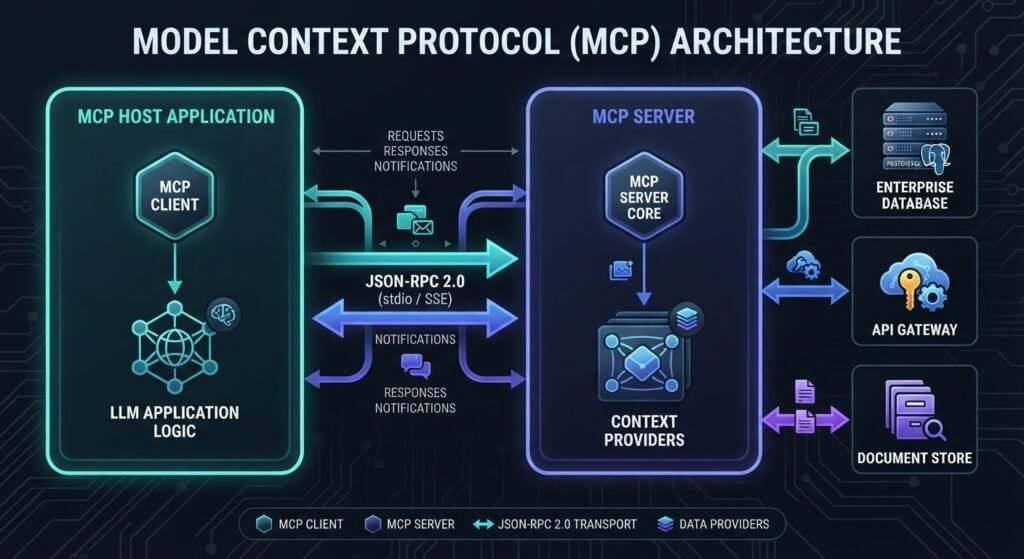
To succeed with this Model Context Protocol integration guide, it is vital to understand the four primary architecture layers that drive MCP communication:
+-------------------------------------------------------------+
|                        MCP Host                             |
|  (e.g., AI IDE, Desktop Client, Custom LLM Application)     |
|                                                             |
|   +-----------------------------------------------------+   |
|   |                     MCP Client                      |   |
|   +--------------------------|--------------------------+   |
+------------------------------|------------------------------+
                               |
               JSON-RPC 2.0 (stdio or SSE)
                               |
+------------------------------|------------------------------+
|   +--------------------------v--------------------------+   |
|   |                     MCP Server                      |   |
|   +-----------------------------------------------------+   |
|                                                             |
|                 External Connection / Driver                |
|                                                             |
|   [ Databases ]       [ Internal APIs ]      [ Cloud Files ]|
+-------------------------------------------------------------+
- MCP Host: The overarching application housing the LLM (such as Claude Desktop, an AI IDE, or a enterprise chat interface).
- MCP Client: The internal component within the Host that manages active connections, maintains session lifecycles, and negotiates capabilities with external servers.
- MCP Server: A lightweight server wrapper around a target data source (e.g., Snowflake, SQL Server, internal GraphQL APIs) exposing capabilities through standardized primitives.
- Transport Layer: The underlying channel transmitting messages via JSON-RPC 2.0.
The Three Core MCP Primitives: Resources, Tools, and Prompts
When an MCP Client connects to an MCP Server, the server exposes three distinct types of primitives to the LLM:
1. Resources (Data Context)
Resources represent readable data points—such as file contents, log streams, database schemas, or API response payloads—that serve as context for the LLM. Resources are addressed using standardized URIs (e.g., postgres://database/schema/users).
2. Tools (Action Execution)
Tools allow the AI model to perform actions through the MCP Server. Examples include executing SQL queries, triggering webhooks, sending notifications, or modifying record states. Each tool includes an explicit JSON schema defining accepted parameters.
3. Prompts (Pre-Built Contextual Workflows)
Prompts are server-side templates designed to guide user workflows. They allow server author to package pre-written system instructions paired with selected resources and tools to streamline repeated team queries.
Step-by-Step Integration Guide: Connecting LLMs to Custom Data Sources
This practical Model Context Protocol integration guide walks through building a custom Python-based MCP Server to expose an internal database to an LLM host.
+-----------------------------------------------------------------+
|               MCP Integration Workflow Pipeline                 |
+-----------------------------------------------------------------+
|  Step 1: Environment Setup & SDK Installation                   |
|  Step 2: Initialize MCP Server Instance                         |
|  Step 3: Define Custom Data Source Resources & URIs             |
|  Step 4: Register Interactive MCP Tools (e.g., Database Query)  |
|  Step 5: Configure Transport Layer (stdio or Remote SSE)        |
|  Step 6: Connect Client Host and Validate via MCP Inspector     |
+-----------------------------------------------------------------+
Step 1: Initialize Your Environment and SDKs
Install the official Python MCP SDK alongside your database driver:
Bash
pip install mcp asyncpg
Step 2: Build the MCP Server Instance
Create a file named custom_data_server.py. Initialize the server instance using FastMCP for lightweight setup:
Python
from mcp.server.fastmcp import FastMCP

# Initialize FastMCP Server
mcp = FastMCP("Enterprise Custom Data Connector")

Step 3: Register Resources for Custom Data Retrieval
Expose customer data records or database schemas as accessible read-only resources:
Python
@mcp.resource("customdata://analytics/summary")
def get_analytics_summary() -> str:
    """Fetch real-time analytics summary from internal custom data source."""
    # Place custom database query or API fetch here
    data_payload = "Total Active Users: 12,450 | System Health: 99.9%"
    return data_payload
Step 4: Define Executable Tools for Data Action
Expose safe, parameterized functions that the LLM can trigger dynamically:
Python
@mcp.tool()
async def query_user_records(department: str) -> str:
    """Query user records filtered by specific department.

    Args:
        department: The target department name (e.g., 'Engineering', 'Sales')
    """
    # Replace with real database call logic
    results = f"Found 3 accounts in {department}: [Alice (Lead), Bob (Dev), Charlie (QA)]"
    return results
Step 5: Run Server via Stdio or SSE Transports
For local development and AI desktop clients, start the server using Standard Input/Output (stdio):
Python
if __name__ == "__main__":
    mcp.run(transport="stdio")
For remote enterprise microservices deployment, switch transport to Server-Sent Events (SSE) over HTTP.
Best Practices for Security, Performance, and RAG Integration
Deploying a production Model Context Protocol integration guide setup requires adherence to robust enterprise security standards:
+-----------------------------------------------------------------------+
|                    Production MCP Deployment Checklist                |
+-----------------------------------------------------------------------+
| [✓] Human-in-the-Loop: Prompt user confirmation for destructive actions|
| [✓] Schema Validation: Enforce strict parameter validation in Tools   |
| [✓] Strict Principle of Least Privilege: Restrict database user roles |
| [✓] Hybrid RAG Architecture: Combine vector search with MCP Tool execution|
+-----------------------------------------------------------------------+
Human-in-the-Loop Confirmation
Never permit an MCP server executing write or delete tool calls to run unchecked. Always ensure the host client requests user confirmation before executing sensitive actions.
MCP vs. Retrieval-Augmented Generation (RAG)
While RAG excels at passive information retrieval from unstructured vector stores, MCP offers standard two-way interaction. Enterprise architectures frequently combine both: RAG handles large-scale semantic text search, while MCP handles direct tool execution and real-time database state checks.
Conclusion
The Model Context Protocol marks a critical shift toward standardizing how artificial intelligence systems interact with corporate data. By replacing fragmented, custom API connectors with a unified schema, teams can connect any LLM to custom data sources quickly, securely, and scalably. Following this Model Context Protocol integration guide ensures your organization builds robust, future-proof AI integrations ready for continuous enterprise evolution.
Frequently Asked Questions (FAQs)
What is the primary purpose of this Model Context Protocol integration guide?
This guide provides a structured blueprint for developers looking to connect LLMs to custom data sources, databases, and APIs using the standardized Model Context Protocol (MCP) framework.
How does MCP differ from traditional function calling?
Traditional function calling requires custom code written for a specific model provider’s API. MCP provides a standardized client-server abstraction layer, allowing any compatible AI client to connect to any MCP server without rewrite.
Is Model Context Protocol open-source?
Yes, MCP is an open-source specification featuring open-source SDKs across multiple languages, including Python, TypeScript, Java, and Go.
Which transport layer should I select for custom data connections?
Use standard input/output (stdio) for local integrations run on desktop clients or local IDEs. Use Server-Sent Events (SSE) over HTTP for remote production server microservices streaming data across corporate networks.
1 thought on “Model Context Protocol integration guide: Connecting LLMs to Custom Data Sources”