How to Deploy a Cloud Application
Deploying a cloud application on Amazon Web Services (AWS) requires more than simply launching a single virtual server. To achieve enterprise-grade reliability, fault tolerance, and security, engineers must architect a resilient infrastructure that separates public-facing entry points from isolated database tiers.
Whether you are deploying a containerized microservice, a serverless application, or a full-stack web app, following a structured deployment framework prevents common pitfalls like exposed database endpoints, unthrottled traffic spikes, and unmanaged cloud costs. This step-by-step guide walks you through building a production-ready AWS environment—from initial Virtual Private Cloud (VPC) design to automated CI/CD deployment pipelines.
Talent500
Key Takeaways
- Architect for Network Isolation: Always isolate application compute and database instances within private subnets, using public subnets strictly for Application Load Balancers (ALB) and NAT Gateways.
- Choose the Right Compute Compute Model: Use AWS Elastic Beanstalk or App Runner for quick prototypes, Amazon ECS/EKS for containerized workloads, or AWS Lambda for event-driven serverless applications.
- Enforce Least-Privilege IAM Policies: Restrict resource permissions using Granular AWS Identity and Access Management (IAM) roles rather than relying on hardcoded access keys. Talent500
- Automate Infrastructure as Code (IaC): Use tools like AWS CDK or HashiCorp Terraform to version-control, audit, and provision cloud resources consistently across environments. Encore.dev
Technical AWS Application Deployment Framework
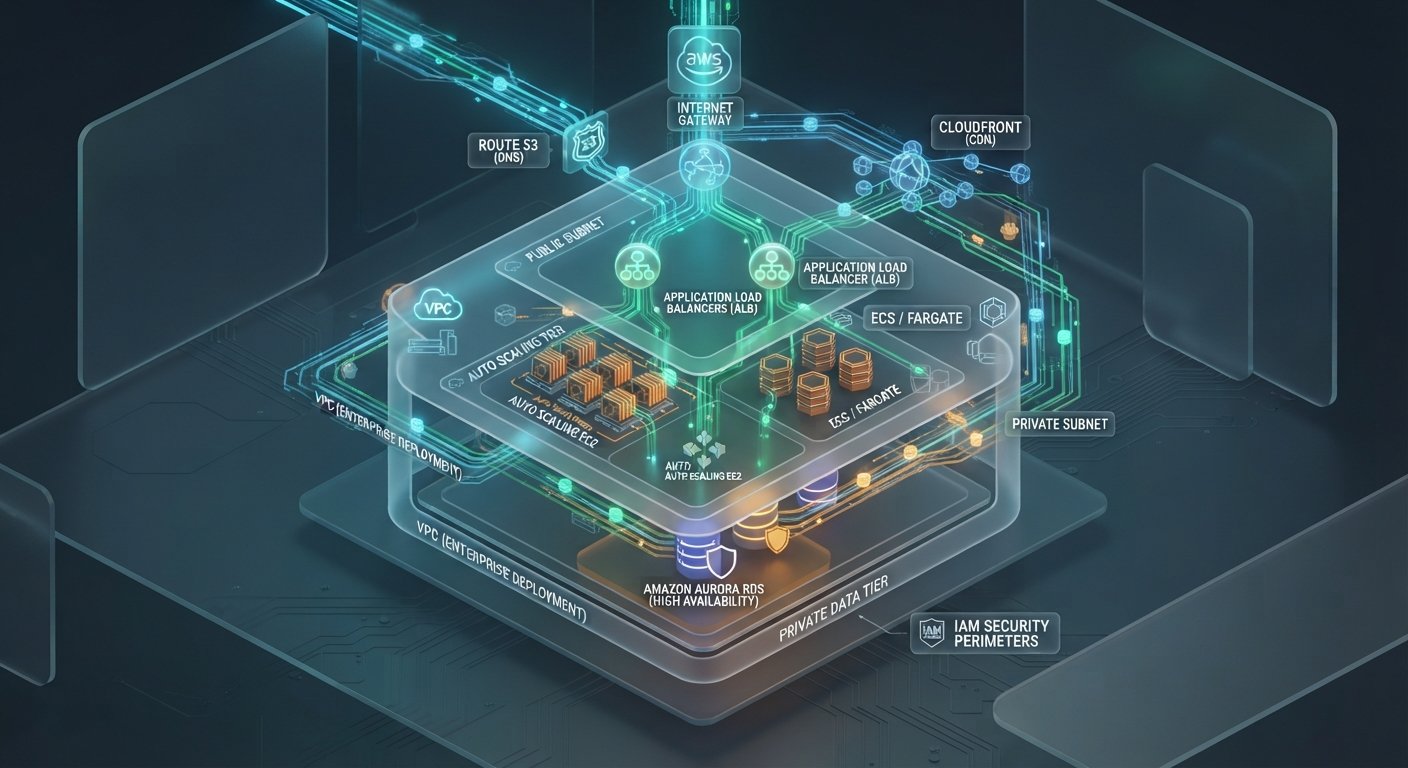
Before executing commands or provisioning resources, understand how traffic flows securely through a standard multi-AZ (Availability Zone) AWS architecture:
┌────────────────────────────────────────────────────────────────────────┐
│               ENTERPRISE AWS DEPLOYMENT ARCHITECTURE                   │
├───────────────────────────────┬────────────────────────────────────────┤
│ EDGE & NETWORK TIER           │ PUBLIC SUBNET (DMZ TIER)               │
├───────────────────────────────┼────────────────────────────────────────┤
│ - Amazon Route 53 (DNS)       │ - Internet Gateway (IGW)               │
│ - Amazon CloudFront (CDN)     │ - Application Load Balancer (ALB)      │
│ - AWS WAF & Shield (Security) │ - NAT Gateway (Outbound Internet)      │
├───────────────────────────────┴────────────────────────────────────────┤
│ PRIVATE SUBNET (APPLICATION & DATA TIER)                               │
│ - Auto Scaling Compute Nodes (EC2 / ECS / Fargate)                     │
│ - Managed Databases (Amazon RDS PostgreSQL / MySQL / DynamoDB)          │
│ - Elasticache (Redis / Memcached for Caching)                          │
└────────────────────────────────────────────────────────────────────────┘
Step 1: Set Up Secure AWS Virtual Private Cloud (VPC) Network
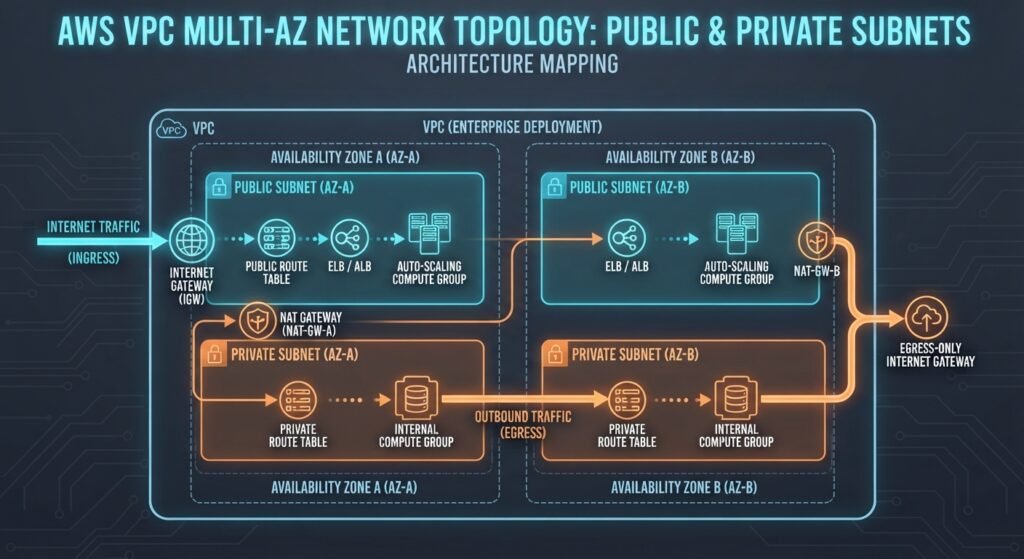
A custom VPC creates an isolated logical network for your application resources. Never deploy production applications directly into the default AWS VPC.
- Create the VPC: Define a Primary IPv4 CIDR block (e.g.,
10.0.0.0/16). - Provision Multi-AZ Subnets:
- Public Subnets (
10.0.1.0/24,10.0.2.0/24): Attached to an Internet Gateway (IGW) to receive external web traffic. - Private Subnets (
10.0.10.0/24,10.0.20.0/24): Isolated from direct incoming internet traffic; used for compute instances and container tasks. - Database Subnets (
10.0.100.0/24,10.0.200.0/24): Strictly restricted subnets hosting database instances.
- Public Subnets (
- Configure Routing: Attach a NAT Gateway in a public subnet so private subnet instances can download patches or pull container images securely without exposing public IP addresses.
Step 2: Configure IAM Roles & Security Groups
Security Groups act as virtual stateful firewalls controlling inbound and outbound traffic at the resource level.
- Load Balancer Security Group: Allow HTTP (Port 80) and HTTPS (Port 443) from
0.0.0.0/0. - Application Security Group: Allow inbound TCP traffic on your application port (e.g., Port
3000,8080, or80) only from the Load Balancer’s Security Group ID. - Database Security Group: Allow inbound database access (e.g., PostgreSQL Port
5432or MySQL Port3306) only from the Application Security Group ID.
IAM Best Practice: Assign an IAM Instance Profile to your compute nodes with execution roles for Amazon CloudWatch logging and AWS Systems Manager (SSM) access, avoiding persistent SSH keys.
Step 3: Provision Database & Storage Infrastructure
Decouple stateful database storage from your application’s ephemeral compute layer.
Option A: Relational Database (Amazon RDS / Aurora)
- Provision an Amazon RDS (PostgreSQL/MySQL) or Amazon Aurora multi-AZ DB instance inside your isolated Database Subnets. DEV Community
- Enable Encryption at Rest using AWS Key Management Service (KMS) and activate automated daily backups with point-in-time recovery. DEV Community
Option B: NoSQL & Object Storage (DynamoDB & S3)
- Use Amazon DynamoDB for low-latency key-value data storage. DEV Community
- Provision an Amazon S3 Bucket for static user upload assets. Configure bucket policies to block public access, serving assets via an Amazon CloudFront CDN distribution. Talent500+ 1
To see how static security scanners help identify hardcoded database keys or misconfigured IAM policies prior to deployment, read our guide on the [Top Static Code Analysis Tools for Detecting Code Vulnerabilities]([Internal Link: Insert relevant internal URL here with anchor text]).
Step 4: Deploy Compute Workloads & Auto Scaling
Select the deployment model that best fits your engineering workflow:
┌─────────────────────────────────────────────────────────────────────────┐
│                    AWS COMPUTE SELECTION GUIDE                          │
├───────────────────┬─────────────────────────────────────────────────────┤
│ COMPUTE OPTION    │ BEST USE CASE                                       │
├───────────────────┼─────────────────────────────────────────────────────┤
│ AWS Elastic       │ Fast, automated web application provisioning with   │
│ Beanstalk         │ managed infrastructure.               │
├───────────────────┼─────────────────────────────────────────────────────┤
│ Amazon ECS /      │ Containerized Docker workloads requiring high       │
│ AWS Fargate       │ operational control and microservice scaling.       │
├───────────────────┼─────────────────────────────────────────────────────┤
│ AWS Lambda &      │ Event-driven, serverless APIs with auto-scaling to  │
│ API Gateway       │ zero during idle periods.      │
└───────────────────┴─────────────────────────────────────────────────────┘
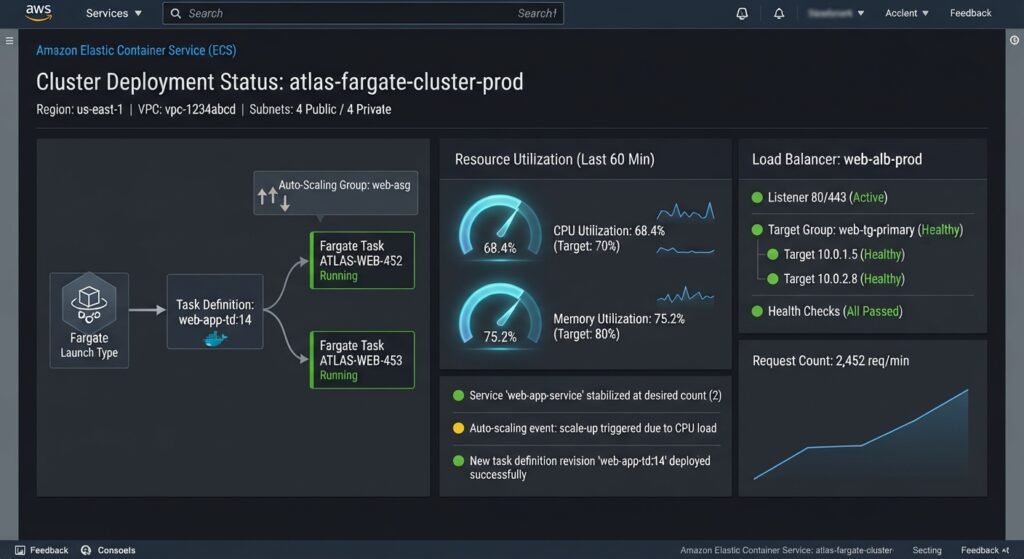
Deploying via Amazon ECS (Fargate Serverless Containers)
- Containerize the App: Build and test your application Docker image locally.
- Push to Amazon ECR: Register and push the image to an Amazon Elastic Container Registry (ECR) repository.
- Define Task Definitions: Specify CPU, memory allocations, environment variables, and AWS KMS secret references.
- Launch ECS Service behind an ALB: Place Fargate tasks in private subnets behind an Application Load Balancer to distribute incoming HTTPS traffic across tasks automatically.
Step 5: Automate Deployments with CI/CD Pipelines
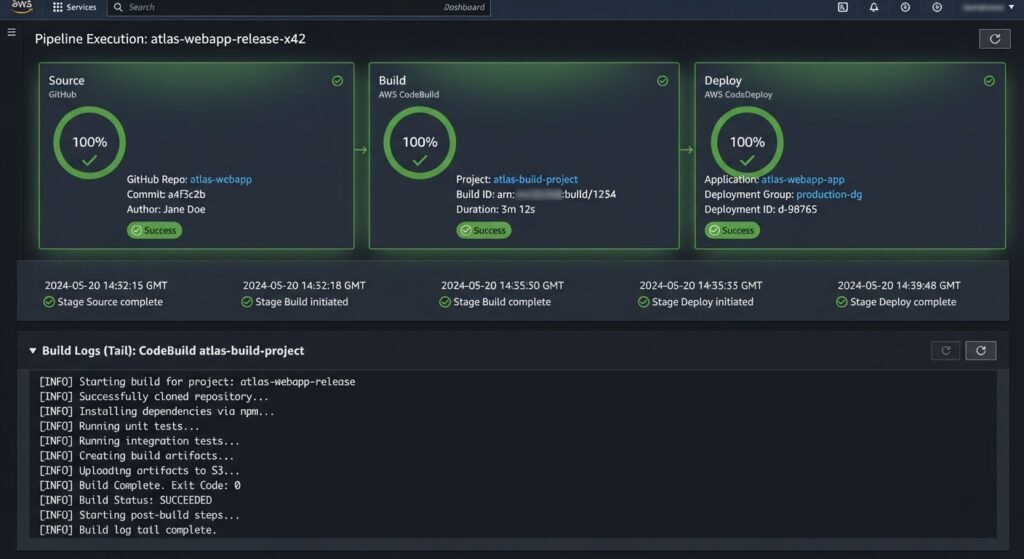
Eliminate manual deployment steps by setting up continuous integration and deployment pipelines.
┌─────────────────────────────────────────────────────────────────────────────────┐
│                    AWS AUTOMATED CI/CD DEPLOYMENT PIPELINE                      │
├──────────────┬──────────────────┬──────────────────┬────────────────────────────┤
│ STEP 1       │ STEP 2           │ STEP 3           │ STEP 4                     │
│ Code Push    │ Build & Test     │ Push Artifacts   │ Zero-Downtime              │
│ (GitHub /    │ (AWS CodeBuild)  │ (Amazon ECR /    │ Deploy (AWS CodeDeploy /   │
│ CodeCommit)  │                  │ S3 Bucket)       │ ECS Rolling Update)        │
└──────────────┴──────────────────┴──────────────────┴────────────────────────────┘
- Source Control Integration: Connect your repository (GitHub, GitLab, or AWS CodeCommit) to AWS CodePipeline.
- Build and Test: Configure AWS CodeBuild using a
buildspec.ymlfile to execute unit tests, compile binaries, and build Docker containers. - Zero-Downtime Deployment: Use AWS CodeDeploy or ECS Rolling Updates (or Blue/Green deployments) to replace application tasks without dropping active user connections.
For official architecture design recommendations, review the AWS Well-Architected Framework Documentation.
Step 6: Enable Monitoring, Logging & Cost Governance
Maintain long-term visibility into application health and cloud spending:
- Centralized Logging: Export application stdout and Nginx logs directly to Amazon CloudWatch Logs.
- Performance Metrics & Alarms: Set CloudWatch Alarms for high CPU utilization (>80%), high HTTP 5xx error rates, or database connection pool exhaustion.
- Audit Trail & Threat Detection: Enable AWS CloudTrail for account auditing and activate AWS GuardDuty for intelligent threat monitoring. DEV Community
- Cost Controls: Configure AWS Budgets to receive immediate notifications when projected monthly spend exceeds operational thresholds.
Conclusion
Learning how to deploy a cloud application on AWS step-by-step equips engineering teams to build resilient, auto-scaling, and secure systems. By isolating resources within custom VPC subnets, leveraging managed database instances, and automating deployments through CI/CD pipelines, organizations achieve high availability without incurring unnecessary operational overhead. As your application traffic expands, continuously review your architecture against the AWS Well-Architected framework to optimize costs and performance.
Nova
Frequently Asked Questions (FAQs)
What is the easiest way to deploy a web application on AWS for beginners?
The simplest method for beginners is AWS Elastic Beanstalk or AWS App Runner. These services automatically handle provisioning, load balancing, auto-scaling, and environment configurations while allowing developers to focus purely on application code.
AWS Documentation+ 1
How much does it cost to deploy a application on AWS?
AWS provides a Free Tier for new accounts, which includes 750 hours of EC2 micro instances, 750 hours of RDS databases, and generous AWS Lambda/S3 usage allowances for 12 months. Production multi-AZ architectures typically scale based on actual compute, bandwidth, and database storage consumption.
How do I prevent downtime during new application deployments on AWS?
Zero-downtime deployments are achieved using Blue/Green deployments or Rolling updates with load balancing. The load balancer routes live traffic to existing application instances while new version containers are provisioned and health-checked, ensuring uninterrupted user service.
AWS Documentation
1 thought on “How to Deploy a Cloud Application on AWS: Step-by-Step Infrastructure Guide”