
In modern cloud-native development, manual builds, local unit test runs, and manual server deployments create major bottlenecks. Engineering teams need rapid release cycles without sacrificing application reliability or code security.
Learning how to build automated CI/CD pipelines using GitHub Actions enables software teams to automate build, test, and release workflows directly inside their source control repository. By shifting integration and deployment tasks to automated runners, developers catch regressions early and accelerate release velocity. This guide provides a step-by-step framework for setting up production-ready CI/CD automation with GitHub Actions.
Key Takeaways
- Native Repository Integration: Discover how to build automated CI/CD pipelines using GitHub Actions directly in your repository without managing third-party CI servers.
- YAML-Driven Workflows: Pipelines are defined declaratively in
.github/workflows/using standard, version-controlled YAML configurations. - Flexible Event Triggers: Execute automated workflows on code pushes, pull requests, scheduled cron expressions, or manual dispatches.
- Secure Environment Management: Protect production API keys, deployment tokens, and cloud credentials using encrypted GitHub Secrets and OpenID Connect (OIDC).
What is GitHub Actions and Why Use It for CI/CD?
GitHub Actions is an integrated automation platform built directly into GitHub. It eliminates the need for separate external CI tools like Jenkins or CircleCI by executing workflow automation on GitHub-hosted virtual machines (Ubuntu, Windows, or macOS) or self-hosted runners.
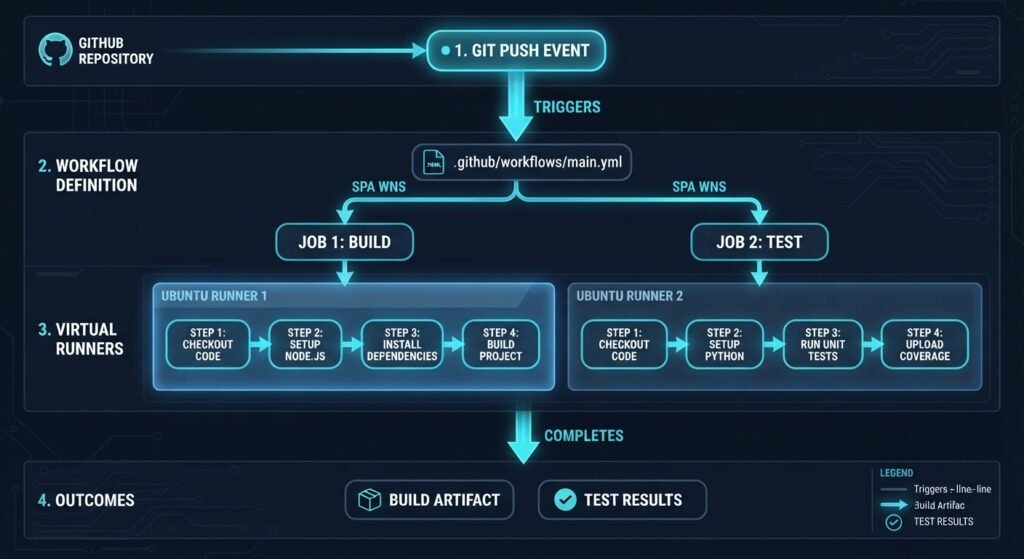
┌─────────────────────────────────────────────────────────────────┐
│              GITHUB ACTIONS CI/CD ARCHITECTURE                  │
├─────────────────────────────────────────────────────────────────┤
│ Event Trigger (push / pull_request)                             │
│       │                                                         │
│       ▼                                                         │
│ Workflow (.github/workflows/ci-cd.yml)                         │
│       │                                                         │
│       ├── Job 1: Build & Test (Ubuntu Runner)                   │
│       │     ├── Step 1: Checkout Code                           │
│       │     ├── Step 2: Set up Runtime / Dependencies           │
│       │     └── Step 3: Execute Test Suite                      │
│       │                                                         │
│       └── Job 2: Deploy to Cloud (Depends on Job 1)             │
│             ├── Step 1: Authenticate via OIDC / Secrets         │
│             └── Step 2: Push Container / Artifacts              │
└─────────────────────────────────────────────────────────────────┘
By leveraging GitHub Actions, software teams gain several operational advantages:
- Zero Server Maintenance: GitHub handles runner provisioning, OS updates, and scaling.
- Community Marketplace Ecosystem: Access thousands of pre-built Actions in the GitHub Marketplace to simplify cloud setup, caching, and notifications.
- Unified Code & DevOps Management: Manage application logic and infrastructure pipelines in the same pull request review workflow.
Before writing pipeline code, understanding the foundational building blocks of GitHub Actions syntax is essential:
- Workflows: Configurable automated processes defined in YAML files located in
.github/workflows/. - Events (
on): Specific repository activities that trigger a workflow run (e.g.,push,pull_request, orschedule). - Jobs (
jobs): A set of sequential steps executed on the same runner instance. Jobs run in parallel by default unless explicit dependencies (needs) are declared. - Steps (
steps): Individual tasks inside a job that run shell commands (run) or execute pre-built community actions (uses). - Runners (
runs-on): Virtual machines hosted by GitHub (or self-hosted) that execute job commands.
Step-by-Step: How to Build Automated CI/CD Pipelines Using GitHub Actions
Follow these actionable steps to set up a continuous integration and continuous deployment pipeline:
Step 1: Create the Workflow Directory
In your project repository, create a directory path named .github/workflows/. Create a new file inside this folder named main-ci-cd.yml.
Step 2: Define Event Triggers and Permissions
Specify when the pipeline should execute and set least-privilege permissions:
YAML
name: Production CI/CD Pipeline

on:
  push:
    branches: [ "main" ]
  pull_request:
    branches: [ "main" ]

permissions:
  contents: read
Step 3: Configure the Continuous Integration (CI) Job
Add a job to checkout the code, install dependencies, run code formatting checks, and execute automated unit test suites:
YAML
jobs:
  build-and-test:
    runs-on: ubuntu-latest

    steps:
      - name: Checkout Source Code
        uses: actions/checkout@v4

      - name: Set up Node.js Runtime
        uses: actions/setup-node@v4
        with:
          node-version: "20"
          cache: "npm"

      - name: Install Project Dependencies
        run: npm ci

      - name: Execute Automated Tests
        run: npm test
Step 4: Configure the Continuous Deployment (CD) Job
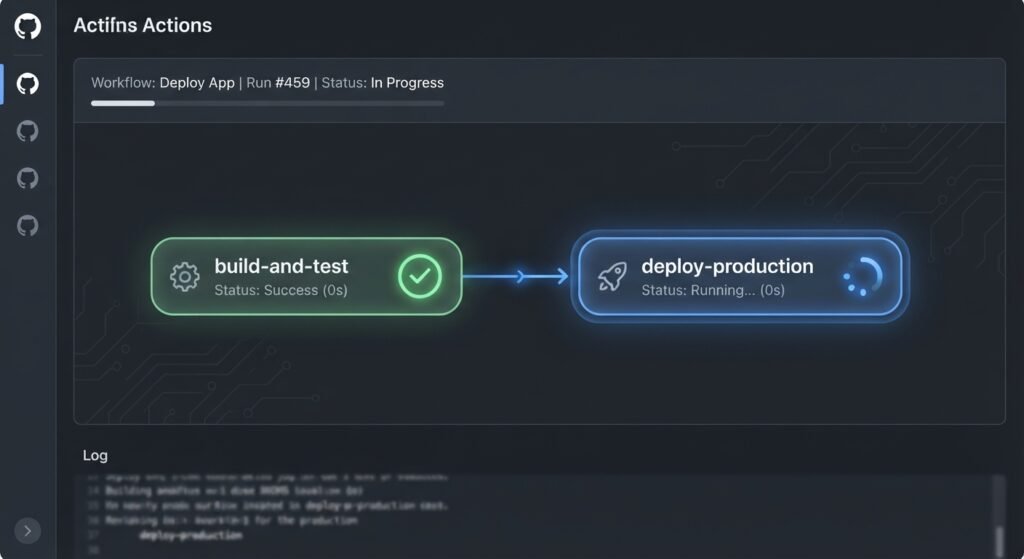
Add a deployment job that runs only after the build-and-test job succeeds on the main branch:
YAML
  deploy-production:
    needs: build-and-test
    if: github.ref == 'refs/heads/main' && github.event_name == 'push'
    runs-on: ubuntu-latest

    steps:
      - name: Checkout Source Code
        uses: actions/checkout@v4

      - name: Deploy to Cloud Provider
        env:
          API_TOKEN: ${{ secrets.DEPLOY_API_TOKEN }}
        run: |
          echo "Deploying production build..."
          # Insert custom deployment CLI commands here
Best Practices for Secure and Fast CI/CD Pipelines how to build automated CI/CD pipelines using GitHub Actions
To maximize performance and security when implementing how to build automated CI/CD pipelines using GitHub Actions, adhere to these enterprise standards:
┌─────────────────────────────────────────────────────────────────────────────────┐
│                    CI/CD PERFORMANCE & SECURITY BEST PRACTICES                   │
├──────────────┬──────────────────┬──────────────────┬────────────────────────────┤
│ STRATEGY 1   │ STRATEGY 2       │ STRATEGY 3       │ STRATEGY 4                 │
│ Leverage     │ Matrix Build     │ Encrypted        │ Pin Action                 │
│ Dependency   │ Parallelism      │ Secrets & OIDC   │ Version SHAs               │
│ Caching      │                  │                  │                            │
└──────────────┴──────────────────┴──────────────────┴────────────────────────────┘
how to build automated CI/CD pipelines using GitHub Actions
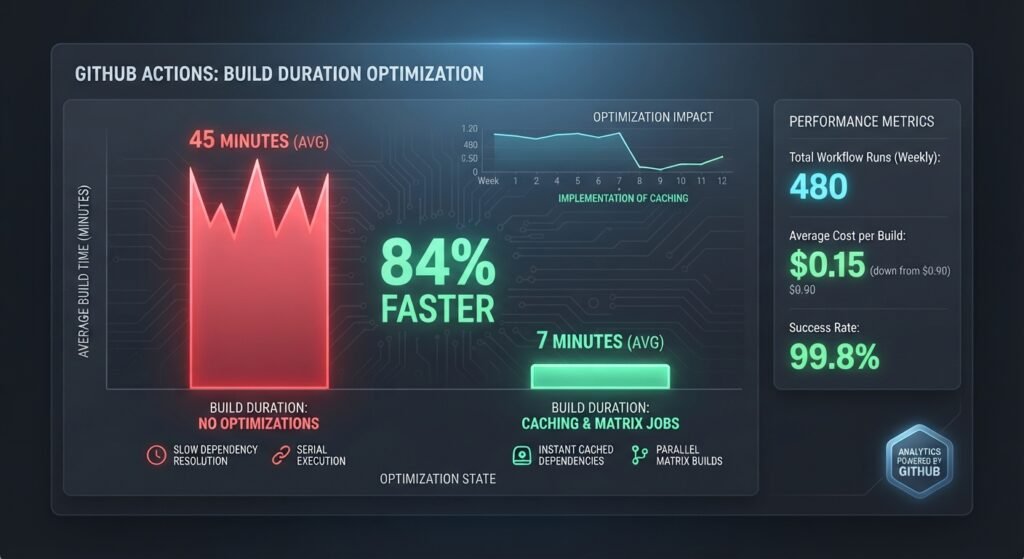
- Implement Dependency Caching: Use
actions/cacheor runtime setup options (cache: 'npm',cache: 'pip') to store downloaded packages between runs, cutting execution times significantly. - Use Matrix Builds for Multi-Environment Testing: Test application compatibility across multiple OS versions and language runtimes concurrently using the
strategy.matrixconfiguration. - Store Credentials Securely: Never hardcode passwords or API keys in YAML files. Store sensitive credentials in GitHub Settings > Secrets and variables > Actions.
- Pin Third-Party Actions to Commit SHAs: Protect pipelines from supply-chain attacks by pinning action dependencies to specific immutable Git commit SHAs instead of mutable version tags.
For official security hardening practices and workflow syntax references, consult the Official GitHub Actions Documentation.
Pipeline Optimization Strategy Matrix
| Pipeline Optimization | Target Problem | Implementation Effort | Build Speed & Security Impact |
|---|---|---|---|
| Dependency Caching | Slow npm / pip package downloads | Low | 30% – 60% faster build times |
Job Concurrency & needs | Unnecessary deployment attempts on failed builds | Low | Prevents broken releases |
| Matrix Executions | Slow sequential testing across runtimes | Medium | Runs tests in parallel |
| OIDC Cloud Auth | Static long-lived cloud credentials | Medium | High security compliance |
Path Filtering (paths) | Running CI on documentation-only edits | Low | Saves pipeline minute quota |
Conclusion
Understanding how to build automated CI/CD pipelines using GitHub Actions equips engineering teams to deliver software rapidly, securely, and reliably. By structuring workflows with YAML, enforcing unit test suites on pull requests, managing secrets securely, and applying dependency caching, you eliminate manual release friction. Implement these continuous integration best practices today to streamline your software deployment lifecycle.
Frequently Asked Questions (FAQs)
What is the fastest way regarding how to build automated CI/CD pipelines using GitHub Actions for a new project?
The fastest approach is using pre-configured starter workflows provided in GitHub’s repository interface under the Actions tab, which automatically detect your project’s programming language and generate a standard .github/workflows/ YAML template.
How do GitHub-hosted runners differ from self-hosted runners?
GitHub-hosted runners are fully managed, ephemeral virtual machines maintained by GitHub. Self-hosted runners are custom cloud instances or physical servers that you manage, offering custom hardware specs and access to private local networks.
Is GitHub Actions free for private repositories?
GitHub Actions offers generous free monthly minutes and storage for standard GitHub-hosted runners across all plans. Public repositories receive free unlimited access to GitHub-hosted standard runners.
1 thought on “How to Build Automated CI/CD Pipelines Using GitHub Actions 2026”